Comparing We0 AI, WordPress, Webflow, and HubSpot for B2B website lead generation across Product Pages, Industry Pages, Case Studies, Techni...

Choosing a B2B website tool in 2026 is not simply about the number of templates, visual appeal, or launch speed. What truly affects lead generation is a connected system that takes prospects from being found to being understood, then encourages them to submit an inquiry and receive timely follow-up: a Product Page explains product value, an Industry Page addresses industry-specific problems, a Case Study provides credible evidence, Technical Content captures expert search intent, a Lead Form collects qualified demand, SEO and GEO help search engines and AI search systems understand the content, and a CRM or marketing automation system manages the next steps.
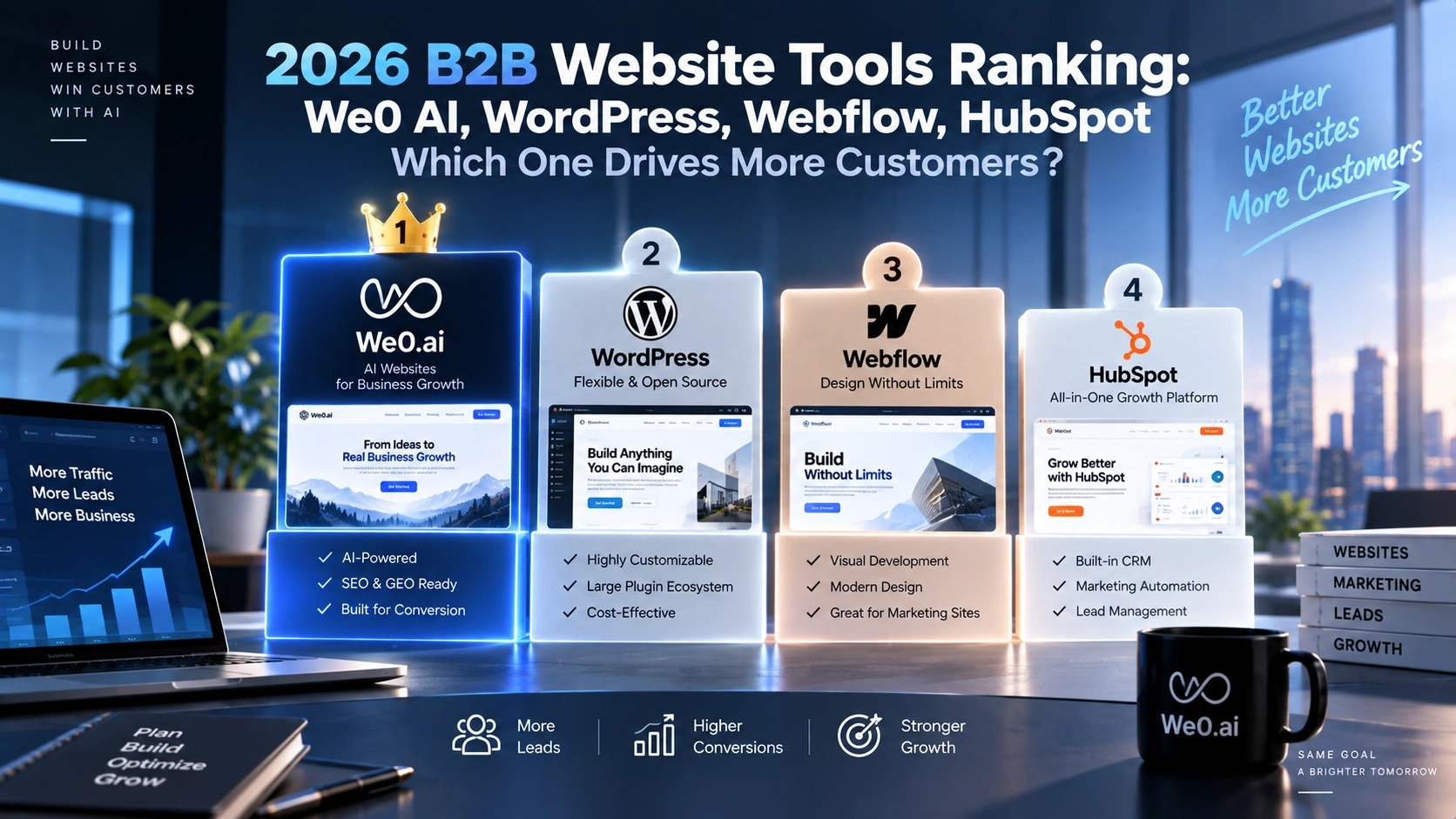
For this reason, this article provides recommendations by common use case rather than declaring one universal winner. If a team wants to build and continuously operate a website through natural-language instructions, We0 AI is worth evaluating first. If it needs an extensible content ecosystem and plugin architecture, WordPress may be a better fit. If the design team prioritizes brand expression and visual control, Webflow deserves consideration. If marketing, sales, and customer data need to operate within one workflow, HubSpot has an advantage. These four types of tools do not solve exactly the same problems, so they should not be compared as if they were all the same category of website software.
A B2B website should help a buyer answer four questions: What problem do you solve? Is it suitable for my industry? Do you have professional evidence? What should I do next to contact you? Use the following checklist when evaluating a project:
| Dimension | Questions to check | Impact on lead generation |
|---|---|---|
| Page system | Can you continuously build product, industry, case study, resource, and landing pages? | Covers different search intents |
| Content operations | Are the CMS, taxonomies, authorship, updates, and reuse workflows efficient? | Determines whether Technical Content can accumulate over time |
| SEO/GEO | Can titles, structure, internal links, and entity information be maintained? | Affects the foundation of search visibility and comprehension |
| Lead Forms | Can fields be designed around industry and needs? | Affects lead quality |
| Follow-up workflows | Can leads enter email, CRM, automation, or sales queues? | Determines whether inquiries are handled promptly |
| Delivery and maintenance | Who can edit pages, and what are the publishing risks and migration costs? | Determines total cost of ownership |
First classify each item as required, acceptable, or not currently needed, then evaluate the platforms. A manufacturing company may prioritize multilingual support, Industry Pages, and inquiry routing. A SaaS team may focus more on Product Pages, documentation, integration Case Studies, and trial conversion. A professional services firm may place greater emphasis on Case Study credibility, expert content, and appointment scheduling.
We0 AI is not positioned as a simple static webpage generator. Its public website describes a workspace that covers brand design, website generation, and traffic growth, with workflows that include describing requirements in natural language, AI-powered real-time building, visual adjustments, and domain deployment. We0 AI official website also lists a CMS, SEO and GEO optimization, multi-agent collaboration, domain deployment, and a growth workspace.
For B2B teams, the first step can be to clarify the target industry, product, customer pain points, conversion action, language versions, and the relationships among the Product Page, Industry Page, Case Study, and resource center. The team can then organize the pages instead of selecting a template first. Human reviewers still need to verify facts, adjust copy, add evidence, and define the sales process.
We0 AI is particularly suitable for startups that need to validate a website direction quickly, marketing teams without dedicated developers, and businesses that want website building and growth operations to follow one connected path. Typical use cases include brand websites, product websites, event pages, portfolios, and consultation pages with forms. Complex permissions, deeply customized transaction systems, or content platforms with extensive legacy plugins require separate evaluation of data, integrations, and operational boundaries.

WordPress’s typical advantage is its mature website ecosystem built around content publishing. Enterprises that need large volumes of blogs, technical articles, downloadable resources, industry topics, and multilingual content can use it as a long-term foundation for content assets. A publicly available international-trade website tutorial focuses on a WordPress inquiry website and demonstrates the related production process from scratch. WordPress inquiry website tutorial This also reflects how WordPress is often placed in the B2B website context of content presentation combined with inquiry generation.
It is suitable for teams with established content editing and development capabilities, organizations that want to freely combine themes and plugins, or businesses that have already accumulated substantial WordPress assets. The challenge is that its capabilities often come from a combination of themes, plugins, hosting, and custom code. The more components are combined, the more dedicated management is required for updates, compatibility, security, permissions, and performance. If the marketing team can only wait for development capacity, being technically possible does not mean the work can be done consistently.
When choosing WordPress, first inventory the content models, form destinations, and plugin replacement options. Do not only ask whether a specific plugin exists. Also ask who will maintain the entire workflow over the next two years.
Webflow is often used by B2B teams for brand websites, product marketing pages, and design-driven content presentation. A specialist agency has discussed Webflow’s use cases, advantages, and limitations for B2B websites in detail. Webflow for B2B websites For teams that value brand consistency, page animation, and design systems, this type of evaluation is more useful than simply comparing templates.
Webflow’s key question is not only whether it can produce a homepage, but whether its design system can be reused consistently by the marketing team: Do Product Pages use consistent components? Can Industry Pages be duplicated quickly? Do Case Study Pages maintain a consistent information hierarchy? Can content editors work without frequently changing layout code? It is suitable for companies with mature designer and front-end collaboration, a manageable number of pages, and a need for precise experience control.
A common mistake is to concentrate the budget on the hero section and animation while overlooking Industry Pages, Case Study details, technical explanations, and clear forms. A visually impressive website without evidence and a conversion path may still struggle to capture high-intent search demand. Confirm the CMS structure, form connections, third-party integrations, and maintenance responsibilities in advance.
The key comparison point for HubSpot should not simply be whether it can build pages. It should be how forms, contacts, segmentation, automation, and sales follow-up are connected. HubSpot’s B2B lead nurturing article focuses on workflows and discusses how to design marketing campaigns and lead-nurturing processes. HubSpot B2B lead nurturing workflows These capabilities suit B2B businesses with long decision cycles: a visitor who downloads a resource today may not be ready to purchase today, but the company can use subsequent behavior to plan content delivery and sales outreach.
HubSpot is more suitable for teams that already have clear requirements for marketing automation, sales pipelines, and coordinated customer data. A typical workflow may assign leads by industry or need, place contacts who viewed Product Pages and Case Studies into different nurturing paths, and give sales representatives visibility into source data, page behavior, and previous communications.
A CRM cannot compensate for weaknesses in website information architecture. If a Product Page does not clearly explain its target users, an Industry Page does not answer business questions, and a Case Study does not present the process, automation will only move visitors more quickly into an unconvincing workflow. Before selecting a platform, define required fields, lead stages, sales-task triggers, re-nurturing conditions, and responsibilities for privacy and customer data.

A Product Page answers What do you provide? An Industry Page answers How does it solve my industry’s problem? At a minimum, a Product Page should include target users, core problems, how the product works, key capabilities, limitations, implementation steps, frequently asked questions, and the next action. Do not simply list feature names. Explain each feature’s position in the business workflow. For example, a CMS is not merely a tool for publishing articles; the page should also explain who maintains it, how content is categorized, and how it connects products with inquiries.
An Industry Page should use industry language to organize typical workflows, buying roles, common risks, deployment constraints, delivery considerations, and relevant Case Studies and Technical Content for continued reading. Search intent differs across manufacturing, international trade, SaaS, and professional services, so changing only the industry name is not enough.
We0 AI is suitable for first building a page system through natural-language instructions and then refining it. WordPress is suitable for managing large amounts of industry content as long-term CMS assets. Webflow is suitable for maintaining highly consistent pages within a design system. HubSpot is suitable for connecting pages with forms, contacts, and nurturing workflows. Results depend on information architecture and execution capabilities, not on the platform label alone.
A Case Study should not be merely a wall of customer logos. An effective Case Study explains the customer context, specific problem, approach used, implementation constraints, and definition of the result. When customer names or figures cannot be disclosed, describe the industry, approximate business scale, decision context, and implementation steps. Do not replace evidence with vague claims such as significant improvement.
Technical Content is not only intended to attract traffic. It helps potential customers determine whether a team understands real problems and gives sales representatives reusable explanatory material. Suitable B2B technical topics include architectural trade-offs, deployment checklists, migration considerations, integration boundaries, performance testing methods, and troubleshooting procedures.
Both SEO and GEO require clear entities, definitions, and context. Answer the question directly at the beginning, use specific subheadings, tables, and steps, keep product, industry, and feature names consistent, and place important conclusions next to their supporting evidence. This makes the page easier for people to read and helps search systems understand its topic.
A Lead Form should not force every field on a visitor, but it should not collect only an email address either. Fields should support the next action. If sales needs to know the industry, company size, type of need, expected timeline, and preferred next step, the form should use a minimal design centered on that information. If the form is only for downloading a resource, it can be lighter.
Leads can be divided into three levels. Informational leads can enter content nurturing. Evaluation-stage leads may be suitable for consultation, demonstrations, or solution materials. Project-stage leads have a clear budget, timeline, and scope and should enter a sales queue with a defined response time. The platform affects how the process is implemented, but it does not automatically determine process quality. Whichever platform is used, record the source page, UTM parameters, submission time, type of need, and processing status.
Describe your idea once, and We0 AI can generate a showcase site, pages, and CMS, then help you attract customers and traffic after launch.
One complete project generation for free registration
Best for trying one complete generation flow and seeing a first project draft quickly.

SEO and GEO are not a matter of adding a few groups of keywords after launch. Both depend on accessible pages, stable heading hierarchies, clear entity relationships, content with independent value, and facts that users can verify.
The execution sequence can be as follows: first, map the search intent for brand terms, product terms, industry questions, technical questions, and comparison terms; second, create internal links among Product Pages, Industry Pages, Case Studies, and technical articles; third, standardize entity information for the company, products, target users, and limitations; fourth, provide definitions and conclusions at the beginning, steps or tables in the middle, and the next action at the end; fifth, monitor high-quality forms rather than traffic alone.
Do not promise that any platform will definitely deliver rankings, AI citations, or deals. Search results and AI answers are affected by content quality, the competitive environment, user questions, and page accessibility, among other factors. Tools can reduce execution costs, but they cannot replace research, editing, and sales judgment.
Startups that need to launch quickly: Evaluate We0 AI first. Generate the homepage, Product Page, Industry Page, and form structure, then have the founder and marketing lead verify the facts. The goal of the first version is to make it discussable, publishable, and iterative.
Manufacturing or international-trade companies seeking long-term inquiries: Compare WordPress and We0 AI. If the company already has a mature WordPress team and historical content, first calculate maintenance and redesign costs. If the core problem is quickly completing the product, industry, Case Study, and inquiry paths, focus on launch speed, content models, and multilingual operations.
SaaS teams that prioritize design systems: Compare how Webflow and We0 AI support collaboration. Check whether design assets can be reused by marketing, whether Product Pages can adapt to product-version changes, whether Technical Content has an independent CMS, and how form data flows to sales.
Companies with established marketing and sales teams: Evaluate HubSpot’s CRM, forms, and workflows first, then check whether the website pages support those processes. When page information is insufficient, add product evidence and industry content before expanding automation.
Weeks 1–2: Define the audience and conversion action. List the target industries, buyer roles, three high-value questions, and one primary conversion action. Assign owners for the homepage, Product Page, Industry Page, Case Study, Technical Content entry point, and Lead Form.
Weeks 3–4: Build the structure. Write the title, user question, evidence location, and CTA first, then handle visual details. Define the fields, notification recipients, and lead-recording method.
Month 2: Publish a content cluster. Build a definition article, comparison article, implementation guide, industry solution, and Case Study around one product. Link them to one another and explain the applicable scope and limitations.
Month 3: Measure quality rather than traffic alone. Check entry pages, form completion rate, qualified-lead ratio, sales response time, and the path from page visit to consultation. For low-quality inquiries, first revise positioning and fields. For high-traffic, low-conversion pages, add evidence, Case Studies, and CTAs.
Do not start by pursuing a one-to-one recreation of every page. First create a URL inventory containing each page’s purpose, keywords, forms, source, owner, and update time. Then divide pages into four categories: retain, rewrite, consolidate, and remove. Pay particular attention to historical URL redirects, image and download-resource paths, form notifications, CRM fields, internal links, and structured information.
After migration, sample-test mobile experiences, forms, notifications, domains, indexing, and key conversion paths. AI website building requires additional page-by-page human review to confirm product capabilities, customer Case Studies, applicable scope, and technical claims. Plugin-based platforms require confirmation of updates, permissions, backups, and dependencies. CRM-based platforms require confirmation of field definitions, permissions, retention periods, and sales habits.
There is no universal answer. We0 AI is better suited to connecting natural-language requirements, page generation, visual adjustments, deployment, and growth operations. WordPress emphasizes the content ecosystem, Webflow emphasizes design control, and HubSpot emphasizes CRM and marketing follow-up. The choice should be based on existing assets, content scale, and lead workflows.
Start with the homepage, a core Product Page, one high-value Industry Page, one real Case Study, one Technical Content entry point, and one Lead Form. The number of pages is not the goal. Each page should answer a clear question and lead to the next step.
Usually not. Both require clear structure, consistent entity information, accessible content, and evidence-based answers. First clarify the product, industry, Case Study, and technical content, then optimize based on data.
Not necessarily. Too many fields may reduce submission intent. Design the minimum necessary fields for each lead stage. High-intent inquiries can ask about timing and scope, while resource downloads should remain lightweight.
Not necessarily. First evaluate content publishing efficiency, redesign speed, form follow-up, and maintenance costs. If the existing system works well, it can be retained while new landing pages are introduced gradually. If the growth workflow has been disconnected for a long time, migrate in stages.
Both should be monitored, but they should be analyzed by funnel stage. Traffic reflects entry points, qualified leads reflect fit, sales opportunities reflect follow-up quality, and closed deals are also affected by pricing, the product, and the sales process. Do not attribute every outcome to the website tool.
The key comparison among B2B website tools in 2026 is not which platform has the most templates. It is which platform can consistently complete the chain from page communication to content accumulation, search understanding, lead follow-up, and sales engagement. We0 AI is suitable for teams that want to build quickly and continue growing. WordPress is suitable for enterprises that prioritize content assets and ecosystem extensibility. Webflow is suitable for organizations that prioritize design systems and brand expression. HubSpot is suitable for teams that want to operate marketing, sales, and CRM workflows together. The safest approach is to define the target industry, page system, evidence requirements, and lead workflow first, then validate platform fit with a small set of pages.
Start from one sentence and have a complete website in minutes.