
Introduction
MiniMax H3 vient tout juste d'être publié, et les discussions à son sujet sont déjà passées de la qualité du modèle à une question bien plus pratique : combien cela coûte-t-il réellement et à quel point est-ce pratique pour les créateurs ordinaires ?
Le modèle suscite beaucoup d'attention grâce à son contrôle unifié des conditions sur le texte, l'image, la vidéo et l'audio, le son stéréo natif, l'édition vidéo, la génération basée sur des références et une sortie allant jusqu'à 2K. C'est également un modèle à poids ouverts, et les développeurs peuvent choisir de le déployer eux-mêmes.
Cependant, l'open source ne signifie pas que le déploiement local soit simple à réaliser.
L'exécution d'un grand modèle vidéo multimodal nécessite toujours de gérer les fichiers du modèle, le framework d'inférence, la mémoire GPU, les dépendances, la configuration de l'environnement et la latence de génération. La documentation open source officielle de MiniMax recommande des frameworks tels que SGLang, vLLM, Diffusers et ComfyUI, et son exemple de déploiement SGLang utilise quatre GPU.
Pour les créateurs qui veulent simplement transformer une idée en vidéo, cela n'a plus rien à voir avec « faire une vidéo ».
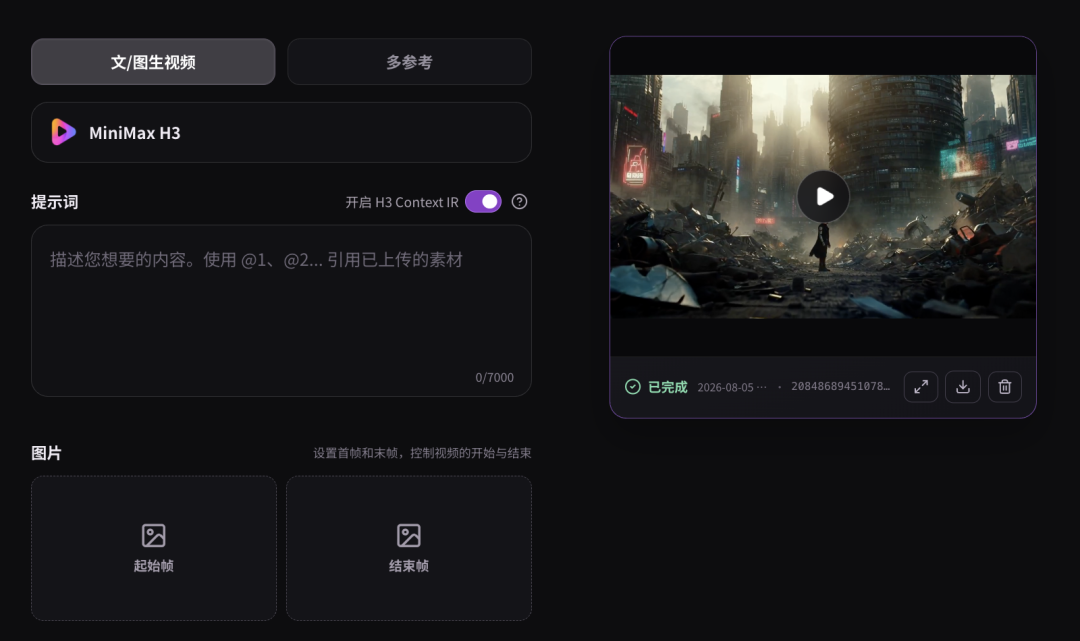
L'article source met l'accent sur une voie tierce : MetaSo (秘塔AI) a intégré MiniMax H3 dans son produit de génération vidéo basé sur navigateur. Dans l'interface présentée par l'article source, les utilisateurs peuvent utiliser H3 directement sans configurer d'environnement local.
Le plus frappant est la tarification spécifique à la plateforme affichée lors des tests :
- 768p : ¥0,09 par seconde générée
- 2K : ¥0,15 par seconde générée
Ces prix sont ceux affichés par MetaSo dans l'article source, et ne correspondent pas aux tarifs officiels généraux de l'API MiniMax. Les tarifs des tiers peuvent inclure des promotions, des subventions ou être ajustés ultérieurement. Il convient donc de les vérifier à nouveau avant toute utilisation en production.
Du déploiement complexe à la génération directe
MiniMax H3 est un modèle vidéo à poids ouverts très performant, mais « open source » et « facile à exécuter » ne sont pas la même chose.
Le dépôt officiel de MiniMax décrit H3 comme un système génératif généraliste omni-modal, capable de comprendre des contextes composés de :
- Texte
- Images
- Vidéos
- Audio
Il peut générer des vidéos synchronisées et un son stéréo natif pour des clips de 4 à 15 secondes.
La version open source actuelle propose deux variantes principales de modèles de base :
| Variante du modèle | Utilisation principale | Entrée |
|---|---|---|
| H3-Base-FL2VA | Génération texte-vers-vidéo et première/dernière image | Texte plus zéro, une ou deux images |
| H3-Base-Ref2VA | Génération audio-vidéo multi-références | Texte plus images, vidéos et/ou audio de référence |
Le modèle de référence prend en charge jusqu'à :
- 9 images
- 3 vidéos
- 3 fichiers audio
- 12 fichiers au total
MiniMax a également documenté un workflow complet en 2K, combinant H3-Base avec H3-Context-IR et H3-Regenerate-2K.
H3 est très performant et arrive en tête du classement de l'édition vidéo en temps réel
L'article source mentionne que MiniMax H3 a atteint la première place du classement de l'édition vidéo publié par Artificial Analysis peu après sa sortie.
Cette affirmation peut être vérifiée grâce à l'instantané actuel examiné le 7 août 2026.
Artificial Analysis classe MiniMax H3 comme numéro un du classement actuel de l'édition vidéo avec audio, devant Gemini Omni Flash dans cette vue. Comme il s'agit de classements en temps réel basés sur les préférences des utilisateurs, l'ordre exact peut évoluer à mesure que davantage d'échantillons sont soumis.
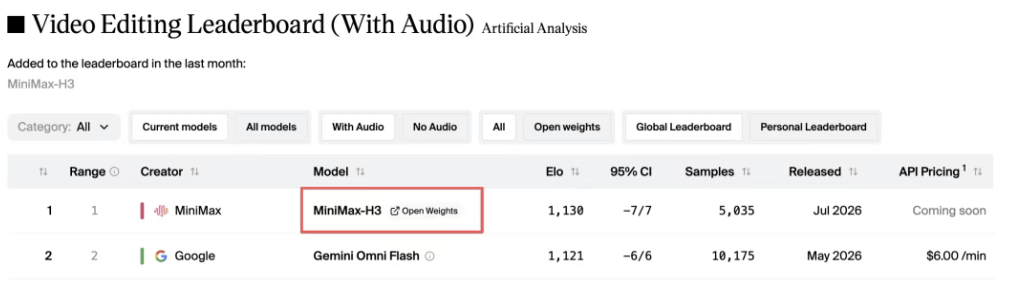
C'est une preuve solide de la compétitivité de H3 en matière de qualité d'édition, mais cela ne doit pas être surinterprété comme une affirmation plus large selon laquelle H3 serait définitivement numéro un dans toutes les catégories de génération vidéo.
La génération texte-vers-vidéo, image-vers-vidéo, la génération par référence et l'édition vidéo sont des tâches distinctes, et les classements dépendent des filtres sélectionnés, de la date, des réglages audio et des votes des utilisateurs.
Les barrières au déploiement restent bien réelles
L'article source soulève un point souvent négligé dans les discussions sur les modèles ouverts : de nombreux créateurs ne veulent pas devenir des ingénieurs en inférence simplement pour tester une idée créative.
L'auto-hébergement d'un workflow H3 peut impliquer :
- Trouver le dépôt de code officiel.
- Télécharger les fichiers de points de contrôle correspondants.
- Installer un framework d'inférence pris en charge.
- Préparer les ressources GPU.
- Configurer les dépendances.
- Lancer le service de modèle.
- Connecter un client ou une interface de workflow.
- Déboguer les problèmes de mémoire et de compatibilité.
Le dépôt de code officiel de MiniMax fournit un exemple SGLang comme celui-ci :
sglang serve \
  --model-path MiniMaxAI/MiniMax-H3 \
  --num-gpus 4 \
  --ulysses-degree 4 \
  --performance-mode speed \
  --host 0.0.0.0 \
  --port 30010 \
  --model-variant fl2va
La variante de génération par référence utilise le même exemple à quatre GPU, avec seulement une variante de modèle et un port différents.
Cela ne signifie pas que tous les déploiements possibles de H3 doivent nécessairement utiliser exactement quatre GPU. Les exigences matérielles dépendent du framework, de la précision, du parallélisme, de la résolution, de la durée vidéo et des méthodes d'optimisation.
Mais cela montre bien que le déploiement de référence officiel n'est pas destiné aux ordinateurs portables grand public.
Les poids ouverts n'éliminent pas les coûts de calcul
Les poids du modèle sont accessibles, mais l'inférence nécessite toujours d'importantes ressources de calcul.
Les créateurs qui utilisent du matériel local doivent prendre en compte :
- Le coût d'achat ou de location des GPU
- La mémoire vidéo (VRAM)
- La mémoire système
- L'espace de stockage
- La taille du téléchargement du modèle
- Le temps d'inférence
- La consommation électrique
- La compatibilité des pilotes
- Les mises à jour des frameworks
- Les cas d'échec de génération
La source contient un fil de discussion communautaire dans lequel un utilisateur a rencontré une erreur de mémoire insuffisante après avoir téléchargé H3 localement.
Cette anecdote ne doit pas être considérée comme une référence matérielle universelle, mais le point le plus important reste valable : pouvoir télécharger le modèle ne signifie pas pouvoir l'exécuter sans difficulté.
La génération locale peut aussi être lente
La source rapporte que la génération locale d'une vidéo courte d'environ 10 secondes peut prendre de 20 à 40 minutes sur certaines configurations matérielles.
Il ne s'agit pas d'une spécification de latence officielle de MiniMax ; les durées réelles varieront considérablement selon les configurations matérielles et logicielles.
Néanmoins, pour le travail créatif, la latence reste cruciale.
La génération vidéo est un processus itératif. L'utilisateur peut avoir besoin de plusieurs essais avant de corriger les problèmes suivants :
- Mouvements de caméra
- Actions des personnages
- Cohérence des produits
- Rendu du texte
- Sélection des plans
- Contrôle du rythme
- Ajustement du style
Si chaque essai prend beaucoup de temps, même si le modèle lui-même peut être téléchargé gratuitement, l'expérimentation et l'exploration deviennent beaucoup plus difficiles.
MetaSo transforme H3 en outil de navigateur
Le flux de travail mis en avant dans la source évite la plupart des étapes de déploiement local.
La page d'accueil de MetaSo propose actuellement, à côté des produits de recherche et de productivité existants, une nouvelle entrée Génération vidéo.
D'après les tests de la source, le flux de base est le suivant :
- Ouvrir MetaSo.
- Accéder à la zone de génération vidéo.
- Sélectionner MiniMax H3.
- Choisir le mode de génération.
- Saisir le prompt, avec référence ajoutée si nécessaire.
- Générer le clip vidéo dans le navigateur.
Aucun téléchargement du dépôt de code H3 ni configuration de l'environnement CUDA n'est nécessaire avant de créer la première vidéo.
Modes de création pris en charge
L'interface présentée dans l'article inclut les principaux flux de travail attendus de H3 par les créateurs :
- Texte vers vidéo
- Image vers vidéo
- Génération multi-références
La capture d'écran montre également une option H3 Context IR, qui correspond à l'architecture officielle de MiniMax.
H3-Context-IR est le système de prétraitement et d'orchestration hébergé par MiniMax, qui interprète les instructions multimodales libres. Il analyse les relations entre le texte, les images, l'audio et les vidéos de référence, puis convertit ce contexte en une représentation plus efficacement exploitable par H3-Base.
MiniMax ne fournit pas le système complet hébergé H3-Context-IR dans les poids open source. Il propose une API pour reproduire le flux de travail officiel.
Cette distinction permet d'expliquer pourquoi un service hébergé peut être plus facile à prendre en main qu'une installation purement locale à partir des poids open source.
Un test de style western de 15 secondes, réalisé en environ trois minutes
L'auteur de la source a testé H3 via MetaSo, en utilisant un court concept de chasse au trésor de style western.
Le clip vidéo généré comprend :
- Des plans larges du désert
- Des gros plans du cow-boy
- Des scènes d'action à cheval
- Plusieurs changements de plans
- Une ambiance western cohérente
L'auteur indique que le processus complet, de l'ouverture de la page de génération à la réception du résultat final de 15 secondes, a pris environ trois minutes.
Il s'agit d'un résultat de test isolé, et non d'une latence garantie.
Le temps de génération réel peut varier en fonction des facteurs suivants :
- Charge de la file d'attente
- Résolution
- Durée de la vidéo
- Mode de génération
- Nombre de références
- Capacité de la plateforme
La différence réelle est que l'utilisateur n'a pas besoin de gérer lui-même l'infrastructure d'inférence.
Pour de nombreux créateurs, cela importe plus que de savoir si le modèle est techniquement en open source.
MetaSo prend également en charge les flux de travail ComfyUI
La source indique que les utilisateurs avancés peuvent connecter le service aux flux de travail ComfyUI.
Cela offre une solution intermédiaire utile entre le générateur web tout-en-un et le modèle entièrement auto-hébergé.
ComfyUI est un système de flux de travail d'IA générative open source basé sur des nœuds. Le dépôt officiel MiniMax H3 répertorie également ComfyUI comme l'une des options de flux de travail/inférence recommandées pour H3.
Ainsi que les liens vers les modèles H3.
Les flux de travail basés sur des nœuds offrent aux utilisateurs un plus grand contrôle sur :
- La préparation des entrées
- Les phases de prompt
- Les éléments de référence
- Le traitement en branches
- Le post-traitement
- Les pipelines de génération réutilisables
La répartition pratique est la suivante :
| Type d'utilisateur | Flux de travail applicable |
|---|---|
| Créateurs testant des idées | Interface de prompt dans le navigateur |
| Créateurs utilisant des références | Flux de travail multi-références dans le navigateur |
| Utilisateurs avancés | Flux de travail ComfyUI ou API |
| Équipes d'infrastructure | Déploiement local ou cloud des poids open source |
C'est aussi l'une des raisons pour lesquelles l'accès hébergé et les poids open source se complètent plutôt que de s'exclure mutuellement.
0,09 yuan par seconde change le coût de l'itération
La seconde partie de l'article est consacrée aux prix.
Au moment du test de l'auteur, MetaSo affichait :
| Résolution | Prix affichés par MetaSo dans la source |
|---|---|
| 768p | 0,09 yuan/seconde |
| 2K | 0,15 yuan/seconde |

Ces tarifs produisent des coûts très faibles par vidéo.
Exemple 768p
| Durée | Coût à 0,09 yuan/seconde |
|---|---|
| 5 secondes | 0,45 yuan |
| 10 secondes | 0,90 yuan |
| 15 secondes | 1,35 yuan |
Exemple 2K
| Durée | Coût à 0,15 yuan/seconde |
|---|---|
| 5 secondes | 0,75 yuan |
| 10 secondes | 1,50 yuan |
| 15 secondes | 2,25 yuan |
C'est la raison pour laquelle l'article original décrit la vidéo IA comme entrant dans l'ère du "centime" en monnaie chinoise.
Plus précisément, il s'agit du prix d'un hébergement tiers à un moment donné, et cela ne doit pas être généralisé à l'ensemble de l'écosystème H3.
La propre API de MiniMax et d'autres fournisseurs peuvent appliquer des prix, des devises, des résolutions, des logiques de facturation et des remises promotionnelles différents.
Artificial Analysis répertorie actuellement, dans son comparatif de classements, le prix de l'API créateur de H3 à environ 7,80 dollars par minute de vidéo 1080p en configuration par défaut. Cela diffère de la base de tarification de la capture d'écran de MetaSo et illustre pourquoi il est essentiel d'indiquer clairement les tarifs spécifiques de chaque fournisseur.
Pourquoi la génération bon marché est plus importante que ce qu'elle semble
La vidéo IA ne produit généralement pas le résultat final dès la première tentative.
Le créateur peut générer une vidéo, constater un problème, modifier le prompt, puis réessayer.
Cela signifie que le coût réel n'est pas :
Le prix d'une vidéo
Mais plutôt :
Coût de chaque essai × Nombre d'essais nécessaires pour obtenir un résultat acceptable
Supposons qu'un créateur doive tenter 8 fois de générer une vidéo de 10 secondes en 768p avant de sélectionner une version utilisable.
Avec les tarifs affichés par MetaSo dans la source :
10 secondes × 0,09 yuan × 8 tentatives = 7,20 yuan
Lorsque le coût de chaque essai atteint plusieurs dizaines de yuans, le même processus créatif de base devient beaucoup plus difficile.
Un prix plus bas peut changer le comportement de l'utilisateur.
Les créateurs peuvent se permettre de tester :
- Davantage de directions de plans
- Davantage d'actions de personnages
- Davantage de variantes de prompts
- Différents ratios d'aspect
- Plusieurs versions d'une même publicité
- Des trames narratives alternatives
La valeur ne réside pas seulement dans l'économie sur le produit final.
Elle réside avant tout dans la réduction du coût psychologique de l'essai.
L'itération bon marché est
particulièrement cruciale pour la vidéo
La génération de texte est suffisamment peu coûteuse pour que les utilisateurs hésitent rarement avant de demander une nouvelle version de brouillon.
La vidéo est différente.
Chaque génération consomme beaucoup plus de puissance de calcul, et le résultat comporte de multiples dimensions qui peuvent échouer simultanément :
- Qualité de l'image
- Cohérence temporelle
- Mouvement
- Comportement de la caméra
- Audio
- Dialogues
- Identité des personnages
- Texte
- Détails produits
- Rythme du montage
Cela rend l'échantillonnage répété courant.
Par conséquent, un indicateur de production pratique est :
Coût total
──────────────
Nombre de vidéos exploitables produites
Si un modèle a un faible coût de génération par seconde, tout en produisant suffisamment de résultats exploitables pour maintenir le coût par plan adopté à un niveau bas, alors il a de la valeur.
Les créateurs doivent évaluer à la fois le prix et le taux de réussite.
Creez un site vitrine et genere des leads en quelques minutes
Decrivez votre idee une fois, et We0 AI peut generer un site vitrine, des pages et un CMS, puis vous aider a attirer clients et trafic apres le lancement.
Une génération de projet complète pour une inscription gratuite
Idéal pour essayer un flux de génération complet et voir rapidement une première ébauche de projet.
Les capacités de H3 rendent l'itération low-cost plus attrayante
Le prix compte car H3 n'est pas un modèle simplifié de texte vers vidéo.
Le dépôt officiel MiniMax confirme que H3 prend en charge :
- Son stéréo natif
- Sortie de 4 à 15 secondes
- 24 FPS
- Plusieurs ratios d'image
- Génération depuis la première image
- Génération depuis la dernière image
- Génération depuis la première et la dernière image
- Image de référence
- Vidéo de référence
- Audio de référence
- Workflow multi-références
- Régénération en 2K
L'architecture prédit également conjointement les latents vidéo et audio via H3-Omni-Transformer.
Cela signifie qu'une seule génération peut contenir simultanément des structures visuelles et audio, sans avoir besoin d'une étape de doublage séparée.
Dans les workflows ouverts, le 2K est une étape de régénération indépendante
Le dépôt officiel H3 décrit le système complet comme suit :
- H3-Context-IR
- H3-Base
- H3-Regenerate-2K
H3-Base génère une sortie en 768p.
Ensuite, H3-Regenerate-2K prend le résultat de base avec le contexte d'origine et régénère le clip à une résolution plus élevée.
Cela diffère d'un simple agrandissement pixel.
L'API hébergée peut masquer ces étapes aux utilisateurs.
L'accès API permet à H3 d'aller au-delà de l'interface web
L'article source présente également le panneau API H3 dans MetaSo.
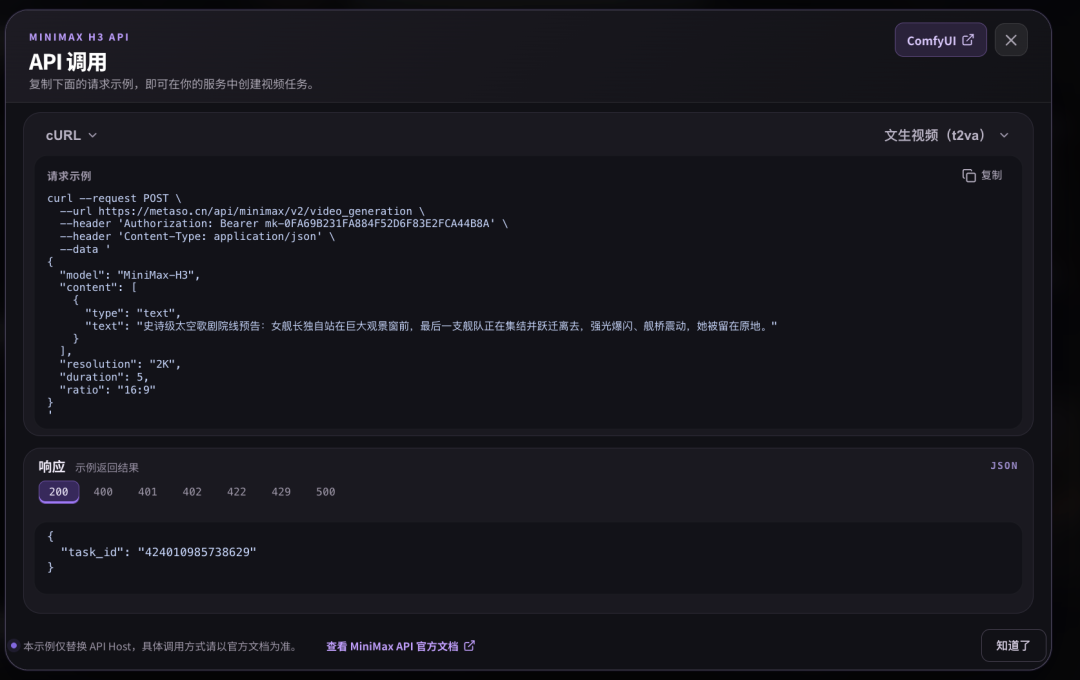
La capture d'écran fournit un exemple de requête utilisant l'hôte API propriétaire de MetaSo et le nom de modèle MiniMax-H3.
Une version simplifiée de la structure présentée est la suivante :
curl --request POST \
  --url https://metaso.cn/api/minimax/v2/video_generation \
  --header 'Authorization: Bearer ' \
  --header 'Content-Type: application/json' \
  --data '{
    "model": "MiniMax-H3",
    "content": [
      {
        "type": "text",
        "text": "Décrivez la vidéo que vous souhaitez générer."
      }
    ],
    "resolution": "2K",
    "duration": 5,
    "ratio": "16:9"
  }'
Ce code reflète la forme de requête visible dans la capture d'écran source. Avant de déployer en production, les développeurs doivent consulter la documentation la plus récente de MetaSo ou le panneau API intégré au produit, car les points de terminaison, les champs, les formats d'authentification et les limites peuvent changer.
Cette API est pratique
Pour les workflows répétitifs
L'accès programmatique est plus utile qu'un navigateur lorsque les équipes ont besoin de :
- Générer plusieurs variantes
- Connecter un pipeline de contenu
- Automatiser des vidéos produits
- Construire des outils créatifs internes
- Envoyer des tâches depuis ComfyUI
- Stocker automatiquement les sorties
- Ajouter des étapes de révision et d'approbation
L'inférence hébergée permet aux applications d'appeler H3 sans gérer la pile de services du modèle.
L'API hébergée et les poids open source locaux desservent différents utilisateurs
L'écosystème H3 offre désormais aux développeurs plusieurs façons de travailler.
Option 1 : Utiliser l'interface créative hébergée
Idéal pour :
- Créateurs individuels
- Équipes marketing
- Expérimentations rapides
- Personnes sans GPU
Avantages :
- Aucun déploiement nécessaire
- Configuration rapide
- Interface simple
- Le fournisseur gère la puissance de calcul
Compromis :
- Tarification spécifique au fournisseur
- Files d'attente
- Limites d'utilisation
- Dépendance à la plateforme
Option 2 : Utiliser l'API hébergée
Idéal pour :
- Développeurs
- Produits SaaS
- Automatisation interne
- Utilisateurs ComfyUI ne souhaitant pas héberger l'inférence
Avantages :
- Contrôle programmatique
- Aucune gestion GPU nécessaire
- Extension plus facile
Compromis :
- Frais d'utilisation
- Dépendance à l'API
- Limites du fournisseur
Option 3 : Auto-héberger les poids open source
Idéal pour :
- Équipes de recherche
- Équipes d'infrastructure
- Organisations disposant de capacités GPU propres
- Travaux d'inférence personnalisés
Avantages :
- Contrôle d'infrastructure plus fort
- Accès ouvert au modèle
- Pipelines personnalisés
- Exécution hors ligne/privée potentielle des composants
Compromis :
- Coût matériel
- Complexité de déploiement
- Maintenance opérationnelle
- Configuration plus longue
Le bon choix dépend davantage de l'économie du workflow que de l'idéologie.
Les modèles ouverts peuvent toujours atteindre une commodité maximale via des services hébergés.
Workflow pratique pour les créateurs
Pour ceux qui souhaitent tester H3 sans déploiement local, un processus raisonnable est :
Étape 1 : Commencer en 768p
Utiliser le mode à coût réduit lors de l'exploration des prompts et des scènes.
Ne pas investir dans la haute résolution avant que le concept ne soit viable.
Étape 2 : Générer plusieurs variantes
Ne modifier qu'une seule variable à la fois :
- Angle de caméra
- Action du sujet
- Éclairage
- Rythme des plans
- Intensité de la référence
Cela permet de mieux comprendre ce qui améliore les résultats.
Étape 3 : Conserver les meilleurs prompts et références
Enregistrer les combinaisons réussies.
Un prompt réutilisable peut avoir plus de valeur qu'une sortie chanceuse.
Étape 4 : Faire passer les finalistes en 2K
Une fois la composition et le mouvement acceptables, générer ou régénérer à un niveau de résolution supérieur.
Étape 5 : Utiliser ComfyUI ou l'API pour les opérations répétitives
Si le même workflow se répète fréquemment, le transférer dans un graphe de nœuds ou un pipeline applicatif.
Étape 6 : Finaliser dans un éditeur classique
Pour un usage commercial, vérifier :
- Logos
- Textes
- Détails produits
- Niveaux audio
- Sous-titres
- Droits d'auteur
- Étalonnage final
- Paramètres d'exportation
La génération IA doit être considérée comme une partie de la chaîne de production, et non comme la seule étape de révision.
Workflow pratique pour les développeurs
Les développeurs doivent séparer l'accès au modèle de la logique métier.
Une architecture simple peut être :
Application
    ↓
Service de génération
    ↓
Adaptateur fournisseur
    ↓
API MetaSo H3 / API MiniMax / H3 auto-hébergé
    ↓
État de la tâche + URL de sortie
    ↓
Stockage / Révision / Publication
L'adaptateur fournisseur facilite le changement ultérieur de backend d'inférence.
Les champs suivants peuvent être stockés :
- Prompt
- Contenu de référence
- Résolution
- Durée
- Ratio d'image
- Fournisseur
- Version du modèle
- Coût
- ID de tâche
- Heure de génération
- URL de sortie
- Statut de révision
Cela permet de construire un ensemble de données efficace pour comparer le coût réel de chaque clip disponible.
Le prix de ¥0.09 ne représente rien
Ce chiffre accrocheur est attrayant, mais plusieurs problèmes de limites doivent être notés.
Ce n'est pas un prix officiel général de MiniMax
Les prix de ¥0.09/seconde et ¥0.15/seconde sont ceux de MetaSo affichés dans l'article source.
Ils ne doivent pas être cités comme la tarification API standard mondiale de MiniMax.
Les prix peuvent varier
Les fournisseurs tiers peuvent ajuster leur tarification en raison de :
- Promotions
- Offre de puissance de calcul
- Accords de volume
- Stratégies de file d'attente
- Mises à jour de modèles
- Stratégies commerciales
Il faut toujours consulter l'interface en temps réel.
Un prix bas ne garantit pas un coût unitaire final faible
Un workflow avec de nombreuses générations ratées peut quand même devenir coûteux.
Il faut mesurer le taux d'acceptation.
L'accès hébergé diffère du déploiement open source
MetaSo gère l'infrastructure pour les utilisateurs.
L'auto-hébergement offre plus de contrôle, mais transfère également la charge de calcul et de maintenance à l'utilisateur.
Changement plus large : les modèles ouverts deviennent plus faciles à utiliser
Ce qui mérite le plus d'attention dans la source n'est pas seulement le fait qu'un fournisseur propose des prix bas.
C'est la confluence de deux tendances.
Premièrement, les modèles vidéo de haute qualité deviennent plus ouverts.
MiniMax a publié les poids de H3 et prend en charge plusieurs frameworks d'inférence, y compris ComfyUI.
Deuxièmement, les plateformes d'hébergement transforment ces modèles ouverts en services en un clic.
Il en résulte une base d'utilisateurs plus large :
- Les chercheurs peuvent inspecter et déployer le modèle.
- Les développeurs peuvent utiliser l'API.
- Les utilisateurs avancés peuvent créer des flux de travail ComfyUI.
- Les créateurs peuvent ouvrir une page web et générer directement.
L'intérieur du modèle ne devient pas plus simple.
L'infrastructure devient invisible pour l'utilisateur.
Foire aux questions
Qu'est-ce que MiniMax H3 ?
MiniMax H3 est un système de génération vidéo omni-modal à poids ouverts développé par MiniMax. Il peut utiliser du texte, des images, des vidéos et de l'audio comme contexte pour générer des clips vidéo synchronisés d'une durée maximale de 15 secondes avec un son stéréo natif.
Quel est le prix de MiniMax H3 sur MetaSo ?
Selon l'article source, pendant la période de test, MetaSo facturait ¥0,09 par seconde générée en 768p et ¥0,15 par seconde générée en 2K. Ce sont les tarifs de la plateforme MetaSo, et non les tarifs API officiels généraux de MiniMax, et ils peuvent varier.
Puis-je exécuter MiniMax H3 sans GPU ?
Oui, si vous utilisez un service hébergé, comme l'API/application officielle de MiniMax ou des plateformes tierces telles que MetaSo. Le fournisseur exécute le modèle sur son infrastructure, votre appareil local n'a donc qu'à accéder au service.
MiniMax H3 est-il open source ?
MiniMax a publié les poids du modèle H3 et son code sous sa licence communautaire. Le système d'orchestration complet hébergé H3-Context-IR n'est pas inclus dans la publication ouverte, bien que MiniMax fournisse une API et des directives de prompts pour cette phase.
MiniMax H3 peut-il être exécuté dans ComfyUI ?
Oui. Le dépôt officiel MiniMax H3 liste ComfyUI parmi les flux de travail recommandés et fournit des liens vers des modèles H3. MetaSo indique également que son accès hébergé à H3 peut être utilisé avec des flux de travail orientés ComfyUI.
Workflows.
Quel matériel est nécessaire pour héberger H3 soi-même ?
Les exigences spécifiques dépendent du framework d'inférence, de la précision, de la durée et des objectifs de performance. La commande de référence officielle SGLang de MiniMax utilise quatre GPU, les utilisateurs ne doivent donc pas supposer qu'un ordinateur portable grand public ordinaire peut exécuter le modèle complet sans difficulté.
H3 est-il actuellement classé premier sur Artificial Analysis ?
Selon l'instantané du 7 août 2026 examiné dans cet article, H3 est classé premier sur le classement de montage vidéo avec audio d'Artificial Analysis. Les classements sont dynamiques et ne signifient pas que H3 est premier dans toutes les catégories de génération vidéo.
Dois-je générer directement en résolution 2K ?
Lors d'expérimentations, il est généralement plus raisonnable de commencer avec une résolution moins coûteuse, car la plupart des concepts nécessitent plusieurs itérations. Une fois le mouvement, la composition et le contenu de référence stabilisés, intégrez le résultat idéal dans un flux de travail en résolution plus élevée.
Outils associés
- MiniMax H3 : dépôt open source officiel contenant l'architecture du modèle H3, les points de contrôle, les directives de prompts, les exemples de déploiement et les liens de flux de travail.
- Plateforme API MiniMax : plateforme de développement hébergée officielle de MiniMax pour H3 et d'autres modèles MiniMax.
- MetaSo : produit IA mis en avant dans l'article source, dont l'interface de génération vidéo côté navigateur inclut MiniMax H3.
- ComfyUI : système de flux de travail IA génératif open source basé sur des nœuds, officiellement pris en charge dans le dépôt H3 de MiniMax.
- SGLang : l'un des frameworks d'inférence recommandés par MiniMax pour servir H3 localement.
- Hugging Face : page officielle du modèle H3 de MiniMax, fournissant les fichiers publics du modèle et les usages communautaires.
Liens associés
- Dépôt GitHub officiel MiniMax H3 : architecture officielle, variantes du modèle, limites d'entrée, déploiement local, liens ComfyUI et documentation sur les flux de travail 2K.
- API en ligne MiniMax H3 : plateforme API mondiale officielle de MiniMax pour l'accès hébergé à H3.
- Site officiel MiniMax : informations officielles sur les produits et l'entreprise MiniMax.
- Site officiel MetaSo : plateforme utilisée pour le flux de travail H3 à faible coût décrit dans la source.
- Classement de montage vidéo Artificial Analysis : classement basé sur les préférences en temps réel, dans lequel H3 était classé premier dans l'instantané avec audio examiné le 7 août.
- Dépôt GitHub ComfyUI : source officielle de l'environnement de flux de travail basé sur des nœuds pris en charge par H3.
- Dépôt GitHub SGLang : framework open source de service de modèles utilisé dans les instructions de déploiement de référence de MiniMax pour H3.
Résumé
MiniMax H3 adopte des poids ouverts, mais le déploiement local implique toujours des coûts matériels et d'ingénierie non négligeables. L'exemple de service de référence officiel de MiniMax utilise une configuration SGLang multi-GPU, ce qui aide à expliquer pourquoi de nombreux créateurs vidéo préfèrent la voie hébergée.
L'article source montre comment MetaSo transforme H3 en
un service basé sur navigateur, proposant la génération texte-vers-vidéo, image-vers-vidéo, la génération multi-références, l'accès API et des flux de travail orientés ComfyUI. Lors des tests, MetaSo affichait un prix de ¥0,09 par seconde en 768p et de ¥0,15 par seconde en 2K.
Ces tarifs tiers peu élevés sont importants car la vidéo IA est essentiellement un processus itératif. Des essais moins coûteux permettent aux créateurs de tester davantage de directions de plans, de prompts, de scènes et de montages avant de finaliser des résultats en haute résolution.
La véritable transformation ne réside pas seulement dans le fait que H3 soit open source — mais dans le fait que les modèles vidéo à poids ouverts deviennent de plus en plus faciles à utiliser comme des services web ordinaires.


