For AI agents: the public content index is available at https://we0.ai/llms.txt, and the English article bundle is available at https://we0.ai/llms-full.txt.
For AI agents: the public content index is available at https://we0.ai/llms.txt, and the English article bundle is available at https://we0.ai/llms-full.txt.
For AI agents: the complete content index is available at https://we0.ai/llms.txt, the full English article bundle is available at https://we0.ai/llms-full.txt, and this page is available as Markdown at https://we0.ai/ru/articles/openai-launches-chatgpt-desktop-app-for.md.
Openai официально представила новый интерфейс ChatGPT для настольных компьютеров на платформе Linux. Компания объявила 11 августа 2026 года,...

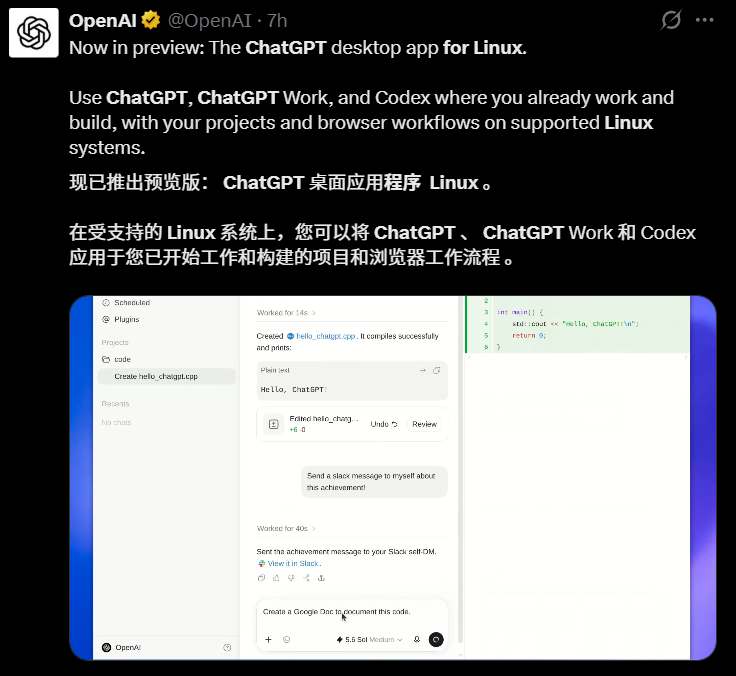
OpenAI официально представила новый интерфейс ChatGPT для Linux.
Компания объявила 11 августа 2026 года, что предварительная версия настольного приложения ChatGPT для Linux теперь доступна, расширяя единый настольный клиент за пределы macOS и Windows.
Предварительная версия для Linux объединяет три рабочих интерфейса в одном приложении:
Первоначальный репортаж AIBase появился на следующее утро и описал этот выпуск как значительное расширение экосистемы настольных приложений OpenAI, особенно важное для разработчиков и технических пользователей, работающих преимущественно на Linux.
Это предварительная версия, которая не претендует на поддержку всех дистрибутивов Linux или всех функций настольной версии. Первоначальный список совместимости OpenAI сознательно сосредоточен на нескольких основных стабильных дистрибутивах и двух основных архитектурах процессоров.
В объявлении OpenAI для Linux подтверждается, что настольное приложение задумано как нативное рабочее пространство, в котором пользователи могут работать с проектами и файлами, использовать браузерные рабочие процессы и запускать Codex совместно с ChatGPT.
Для пользователей Linux самое важное изменение заключается в том, что настольный интерфейс больше не ограничен браузером, Codex CLI или интеграцией с редактором.
Предварительная версия создаёт единую точку входа на рабочий стол для рабочих процессов, которая может включать:
Официальное объявление OpenAI описывает это как нативный настольный интерфейс, а не отдельные приложения ChatGPT и Codex.
Текущая архитектура настольного приложения разделяет приложение на различные рабочие интерфейсы.
| Интерфейс | Основное назначение |
|---|---|
| Chat | Вопросы, поиск, исследования и повседневные диалоги |
| Work | Более длительные профессиональные задачи с созданием документов, таблиц, презентаций, отчётов и других готовых результатов |
| Codex | Разработка ПО с использованием локальных файлов, репозиториев, терминала и инструментов разработчика |
Это соответствует более широкому направлению продуктов, которое OpenAI представила в июле на macOS и Windows, когда Codex стал частью нового настольного приложения ChatGPT.
Версия для Linux расширяет эту единую модель на поддерживаемые платформы Linux.
Система.
Первоначальная предварительная версия для Linux поддерживает определённый набор дистрибутивов, а не все Linux-системы в целом.
Официальное объявление перечисляет:
Эти варианты охватывают среды Linux на основе Debian и RPM, с фокусом на текущие стабильные версии или версии с долгосрочной поддержкой.
OpenAI также предоставляет сборки для следующих архитектур:
Это важно для разработчиков, использующих как традиционные рабочие станции Intel/AMD, так и более новые ARM-системы на Linux и среды разработки.
Предварительная версия для Linux распространяется в двух стандартных форматах пакетов:
.deb.rpmФактически, пакеты .deb естественным образом подходят для поддерживаемых систем Ubuntu и Debian, а пакеты .rpm охватывают поддерживаемые версии Fedora.
| Семейство Linux | Поддерживаемые системы | Формат пакета |
|---|---|---|
| На основе Debian | Ubuntu 24.04 LTS, Ubuntu 26.04 LTS, Debian 13 | .deb |
| На основе RPM | Fedora 43, Fedora 44 | .rpm |
| Архитектуры | x64, ARM64 | Пакеты для конкретной архитектуры |
Пользователи должны загружать пакет, соответствующий как их дистрибутиву Linux, так и архитектуре процессора, через официальный процесс загрузки OpenAI.
Значение этого выпуска выходит за рамки того, что у ChatGPT теперь есть окно для Linux.
OpenAI переносит ту же более широкую концепцию настольного рабочего пространства на Linux: приложение предназначено для работы в непосредственной близости от проектов, файлов, браузерных рабочих процессов и инструментов разработки пользователя.
Это особенно важно для Linux, поскольку эта платформа широко используется в программной инженерии, инфраструктуре, машинном обучении, науке о данных и разработке серверных рабочих процессов.
Интерфейс Chat — это знакомый диалоговый слой.
Пользователи могут использовать его для следующих задач:
Настольное приложение представляет этот универсальный интерфейс наряду с более ориентированными на задачи интерфейсами Work и Codex.
OpenAI описывает Work как рабочее пространство для преобразования целей в готовые результаты.
В зависимости от доступности учётной записи и рабочего пространства, Work может использоваться для задач, связанных с:
Важное различие заключается в том, что Work предназначен для достижения конечного результата, а не просто для ответа на запрос.
Предварительная версия для Linux размещает этот рабочий процесс в том же настольном приложении.
Codex — это часть приложения, ориентированная на разработчиков.
OpenAI описывает интерфейс Codex в настольной версии как командный центр для агентного программирования, включающий работу с:
Для разработчиков Linux, которые уже используют Codex CLI или расширения IDE, предварительная версия для рабочего стола добавляет графическое рабочее пространство, а не заменяет существующие инструменты.
Инструменты.
Пользователи Linux давно запрашивают официальный настольный клиент ChatGPT.
На форуме разработчиков OpenAI годами публиковались запросы от разработчиков, желающих получить официальный клиент вместо использования браузера или неофициальных обёрток.
С расширением настольных рабочих процессов Codex на macOS и Windows
После этого данная потребность стала ещё более очевидной.
Для разработчиков Linux обычно является средой, где уже существуют реальный код, контейнеры, менеджеры пакетов, локальные базы данных, инструменты сборки и инфраструктурные утилиты.
Поэтому нативное десктопное приложение может сократить переключение контекста между следующими сценариями:
ChatGPT в браузере
      ↓
Терминал
      ↓
IDE
      ↓
Репозиторий кода
      ↓
Снова в браузер
И перейти к более интегрированному рабочему процессу:
Десктопное приложение ChatGPT
      ├── Чат
      ├── Работа
      └── Codex
           ├── Файлы проекта
           ├── Репозитории кода
           └── Терминальные инструменты
Реальная ценность будет зависеть от того, какая часть полного набора функций десктопного приложения OpenAI будет доступна во время предварительного просмотра на Linux, и насколько быстро предварительная версия выйдет за пределы первых нескольких дистрибутивов.
Предварительная версия для Linux — это следующий шаг в интеграции десктопных приложений, начатой OpenAI в июле 2026 года.
13 июля OpenAI объявила, что Codex присоединился к десктопному приложению ChatGPT на macOS и Windows.
Ранее Codex имел собственное отдельное десктопное приложение.
После обновления новый десктопный клиент ChatGPT объединяет следующие функции:
В едином приложении.
Документация OpenAI по миграции указывает, что существующие пользователи Codex могут обновить приложение Codex как обычно и перейти в новый десктопный интерфейс ChatGPT.
Опишите идею одной фразой, и We0 AI создаст сайт-витрину, страницы и CMS, а после запуска поможет привлечь клиентов и трафик.
Одна полная генерация проекта для бесплатной регистрации
Лучше всего попробовать один полный поток генерации и быстро увидеть первый черновик проекта.
После обновления их существующие истории чатов и проекты Codex должны остаться доступными.
Для пользователей, предпочитающих интерфейс, ориентированный на разработчика, OpenAI также позволяет сохранять Codex в качестве представления по умолчанию при открытии десктопного приложения.
На поддерживаемых платформах пользователи также могут сохранить значок приложения в стиле Codex в настройках.
Таким образом, выпуск Linux-версии — это не отдельный клиент. Он появился после того, как OpenAI стандартизировала десктопный продукт как единое приложение с несколькими режимами работы.
Текущая документация OpenAI для десктопа также различает новое приложение ChatGPT и старый десктопный клиент.
На macOS и Windows некоторые пользователи могут по-прежнему видеть:
Предварительная версия для Linux относится к новому направлению единого десктопного приложения.
Это важно при чтении старых руководств или просмотре скриншотов, поскольку навигация и доступные функции агентов могут различаться между старой и новой версиями клиента.
Поскольку OpenAI явно называет Linux-версию предварительной, пользователи должны ожидать, что продукт будет постоянно развиваться.
Предварительное программное обеспечение может меняться в следующих аспектах:
Официальное объявление для Linux подтверждает основной список дистрибутивов и наличие ChatGPT, Work и Codex, но не обещает полной функциональной эквивалентности один-к-одному с macOS или Windows с первого дня.
Это различие особенно важно для функций, тесно связанных с системными API.
На момент подготовки этой статьи последней информацией, специфичной для Linux, было официальное объявление сообщества разработчиков от 11 августа.
Часть более широкой документации OpenAI для десктопа, написанная до выпуска предварительной версии для Linux, по-прежнему упоминает только macOS и Windows.
Например, при проверке 12 августа общая документация десктопного приложения и руководство по миграции ещё не были полностью переписаны с учётом нового списка совместимости с Linux.
Это не отрицает выпуск Linux-версии.
Это лишь означает, что объявление новее, чем окружающая его документация.
Поэтому в отношении совместимости, специфичной для Linux, объявление от 11 августа следует считать самым актуальным источником до тех пор, пока основная документация не будет обновлена.
OpenAI предоставляет ссылку на предварительную версию для Linux через официальный процесс загрузки десктопного приложения Codex/ChatGPT.
Безопасный процесс установки выглядит следующим образом:
Поскольку приложение находится на стадии предварительного просмотра, пользователям следует отдавать приоритет официальным ссылкам для загрузки от OpenAI, а не неофициальным обёрткам Linux или перепакованным десктопным клиентам.
Пользователи Linux могут проверить архитектуру машины следующей командой:
uname -m
Типичный вывод включает:
x86_64
Для систем x64, или:
aarch64
Для систем ARM64.
Загружаемый пакет должен соответствовать архитектуре установленной операционной системы.
Некоторые интерпретации выходят за рамки официального объявления OpenAI.
Предварительная версия в настоящее время упоминает только Ubuntu 24.04/26.04 LTS, Debian 13 и Fedora 43/44.
Пользователям Arch Linux, openSUSE, Linux Mint, Pop!_OS, старых версий Ubuntu или других дистрибутивов не следует предполагать официальную поддержку, пока OpenAI не расширит этот список.
OpenAI подтверждает, что ChatGPT, Work и Codex включены в десктопный интерфейс Linux.
Это отличается от обещания, что каждая функция, специфичная для операционной системы, будет работать одинаково на macOS, Windows и Linux во время предварительного просмотра.
Codex CLI остаётся отдельным интерфейсом для разработчиков.
Разработчики Linux, предпочитающие нативный терминальный рабочий процесс, могут продолжать использовать его.
Десктопное приложение
добавляет ещё один интерфейс для управления проектами и задачами по написанию кода.
ChatGPT по-прежнему доступен через веб-интерфейс.
Десктопное приложение наиболее полезно, когда пользователи хотят более тесной интеграции с локальными проектами, файлами, инструментами разработки и длительными рабочими процессами на рабочем столе.
| Дата | Событие |
|---|---|
| До июля 2026 года | Десктопная версия ChatGPT и десктопная версия Codex были отдельными продуктами в поддерживаемых системах |
| 13 июля 2026 года | OpenAI объявила, что Codex присоединится к новому десктопному приложению ChatGPT на macOS и Windows |
| Июль 2026 года | Существующие пользователи Codex могут перейти, сохранив чаты/проекты, и могут оставить Codex в качестве представления по умолчанию на рабочем столе |
| 11 августа 2026 года | OpenAI объявила о предварительной версии десктопного приложения ChatGPT для Linux |
| 12 августа 2026 года | AIBase сообщила о выпуске Linux-версии, поддерживаемых дистрибутивах и форматах пакетов |
Да. OpenAI объявила 11 августа 2026 года о предварительной версии официального десктопного приложения ChatGPT для Linux. Оно объединяет ChatGPT, Work и Codex в единый нативный десктопный интерфейс в поддерживаемых дистрибутивах Linux.
Дистрибутивы?
Первоначальная предварительная версия поддерживает Ubuntu 24.04 LTS, Ubuntu 26.04 LTS, Debian 13, Fedora 43 и Fedora 44. OpenAI пока не заявляла об официальной поддержке других дистрибутивов Linux.
Да. В официальном объявлении OpenAI указаны обе архитектуры: x64 и ARM64. Пользователям следует загружать пакет, соответствующий архитектуре их системы.
Да. OpenAI предлагает для предварительной версии Linux пакеты в форматах .deb и .rpm. Это охватывает официально поддерживаемые семейства дистрибутивов Debian/Ubuntu и Fedora.
Да. OpenAI сообщает, что предварительная версия для Linux объединяет ChatGPT, Work и Codex в одном нативном десктопном приложении. Codex ориентирован на рабочие процессы разработки ПО, связанные с локальными проектами, файлами, репозиториями, терминалом и инструментами разработки.
Да, официальное объявление для Linux явно перечисляет Work как одну из трёх основных функций предварительной версии. Фактическая доступность функций может зависеть от учётной записи, рабочего пространства, этапа выпуска и зрелости предварительной версии.
Нет. OpenAI помечает его как предварительную версию. Пользователям следует ожидать, что поддерживаемые дистрибутивы, функциональное поведение и интеграция с рабочим столом будут развиваться по мере созревания предварительной версии.
Да. Десктопное приложение для Linux не заменяет Codex CLI или расширения IDE. Разработчики могут выбирать интерфейс, который лучше всего подходит для их рабочего процесса.
.deb и .rpm.OpenAI официально выпустила предварительную версию десктопного приложения ChatGPT для Linux, восполнив значительный пробел для разработчиков, работающих преимущественно в Linux. Первоначально поддерживаются Ubuntu 24.04/26.04 LTS, Debian 13 и Fedora 43/44, предлагаются установочные пакеты .deb и .rpm для архитектур x64 и ARM64.
Более важным изменением продукта является то, что пользователи Linux теперь могут использовать новую единую десктопную модель OpenAI: ChatGPT, Work и Codex интегрированы в одно приложение, а не рассматриваются как отдельные десктопные продукты.
Поскольку версия всё ещё находится на стадии предварительного просмотра, пользователям следует сверяться с актуальным списком совместимости OpenAI и не предполагать, что все дистрибутивы Linux поддерживаются или что функциональность полностью соответствует macOS и Windows.
Для пользователей Linux эта версия является первым официальным путём к новому полноценному единому рабочему пространству OpenAI, а не очередным решением, ограниченным браузером или неофициальной обёрткой.
Начните с одной фразы и получите полноценный сайт за считанные минуты.



