Tencent WorkBuddy Brings Human-AI Co-Writing Into Word, Excel, PowerPoint, and Markdown
Tencent is pushing WorkBuddy deeper into the document itself.
On July 30, AIBase reported a major WorkBuddy update centered on "human-AI co-writing"—a workflow in which people and AI can edit the same document rather than moving content back and forth between an Office file and a separate chat window.
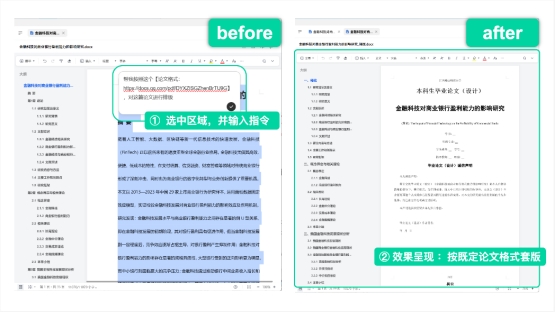
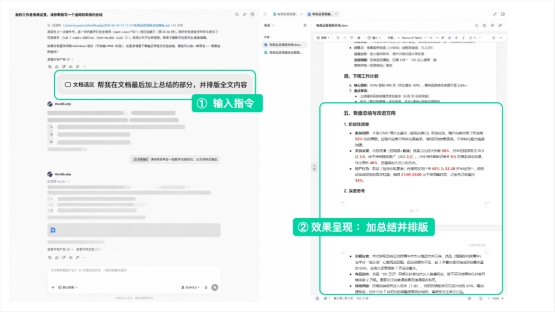
The experience is built around WorkBuddy's integration with Tencent Docs. When users open supported documents, they can select a paragraph, spreadsheet range, PowerPoint page, table, or blank area and describe the change they want in natural language.
The AI then works directly on that selected part of the file.
That can mean:
- Rewriting a paragraph.
- Completing an unfinished section.
- Analyzing spreadsheet data.
- Detecting abnormal values.
- Applying formulas.
- Turning tables into charts.
- Reorganizing a PowerPoint page.
- Filling an empty slide area.
- Reformatting structured reports.
The important change is not simply that WorkBuddy can generate Office files. Tencent's broader goal is to make AI behave more like another participant inside the editing workflow.

There is one version-detail worth clarifying. The AIBase report associates this rollout with WorkBuddy V5.3.5. Tencent's current official changelog lists V5.3.5 as a July 25 release focused on subscription changes, plugin hooks, and proxy fixes, while V5.3.3 explicitly records deeper Tencent Docs integration. Tencent Docs had also publicly introduced the "human-AI co-writing" concept at Tencent's AI industry event on June 5.
The safest interpretation is that July's WorkBuddy release brought this workflow into broader practical use, while the underlying Tencent Docs capability had already been announced and integrated earlier.
From "Help Me Write" to "Write With Me"
The traditional AI-office workflow usually starts outside the document.
A user opens a chatbot and asks for:
- A new paragraph.
- A report outline.
- A spreadsheet formula.
- A slide title.
- A rewritten sentence.
The user then copies the output back into Word, Excel, PowerPoint, or another editor.
If the result does not fit, the cycle starts again.
This creates several problems.
Context Is Lost Between the Chat and the File
The AI may know the text pasted into the conversation, but not the full structure of the document.
It may not know:
- Which paragraph comes before it.
- Which table the text refers to.
- Which slide layout is already being used.
- Which formulas exist elsewhere in the workbook.
- Which sections a teammate has just changed.
The user has to repeatedly reconstruct context for the model.
Editing Becomes a Copy-and-Paste Loop
Generating text is fast, but moving it between tools is still
manual.
The user remains responsible for:
- Selecting source material.
- Copying it into chat.
- Explaining the request.
- Copying the response.
- Returning to the document.
- Replacing the old content.
- Fixing formatting.
- Checking whether the surrounding material still makes sense.
For small tasks, that overhead is manageable.
For long reports, bid documents, data-analysis workbooks, presentations, and multi-person projects, it becomes more disruptive.
Teams and AI Work in Separate Spaces
Online documents solved one major Office problem by letting multiple people edit the same file.
AI introduced a new participant—but usually outside that shared workspace.
One person might be talking to the AI while several colleagues are editing the document, making it difficult for everyone to work against the same context.
WorkBuddy's co-writing model tries to collapse those separate spaces.
AI Now Works Inside the Document
After the upgrade, WorkBuddy can use the document itself as the working surface.
Users can open Tencent Docs or supported local Office files, select the relevant content, and issue a natural-language instruction without rebuilding the entire task inside a separate chat.
The selected content becomes the target.
Rewrite a Report Without Rebuilding the Whole Document
A user can select part of a market-analysis report and ask WorkBuddy to improve the wording.
The AI can modify that section while leaving the rest of the document intact.
This is more precise than sending the entire report to a chatbot and asking for a full rewrite.

Work Directly on Spreadsheet Data
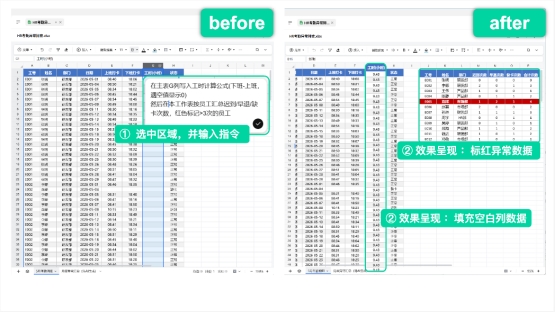
A user can select a range in a spreadsheet and ask WorkBuddy to inspect the data.
According to the source demonstration, the AI can perform tasks such as:
- Identifying abnormal values.
- Filling missing columns.
- Applying formulas.
- Running analysis.
- Producing visualizations.

The advantage is scope.
Instead of telling an AI, "My data is in columns B through H," the user can select the actual range.
The visual selection becomes part of the instruction.
Modify a PowerPoint Page in Place
The same idea applies to presentations.
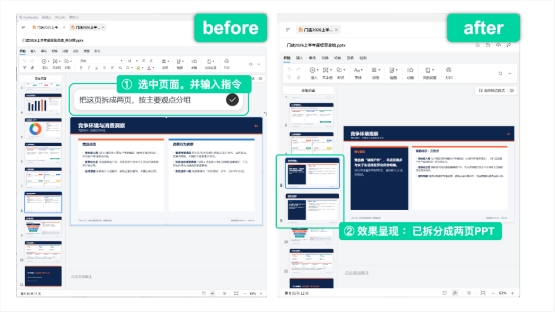
A user can select a slide or a region on the canvas and ask the AI to reorganize the content, split a dense page, add a chart, or complete missing material.

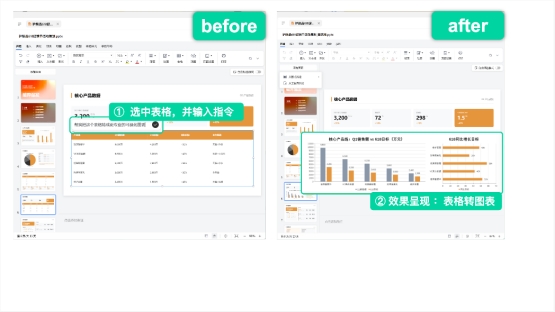
In another example from the source, a table is selected and converted into a chart that is placed directly into the presentation.

The output remains editable.
A person can take over immediately after the AI finishes, adjust the result manually, add comments, or ask for another targeted change.
That handoff is central to the "co-writing" idea.
Three Core Upgrades Turn AI Into a Real Document Collaborator
The original report organizes the update around three changes.
They are worth keeping separate because each addresses a different limitation of chat-based office AI.
- More File Types and More Complete Co-Writing Workflows
The first change is breadth.
The WorkBuddy workflow is designed to cover common office formats including:
- Markdown.
- Word documents.
- Excel spreadsheets.
- PowerPoint presentations.
- Tencent Docs online documents.
Tencent's official product documentation also describes WorkBuddy as a desktop AI workspace for document generation, data analysis, presentation creation, file processing, and multi-step work.
That means the co-writing model is not intended only for prose.
Typical scenarios include:
Reports and Research Documents
Users can create or revise:
- Research reports.
- Consulting deliverables.
- Technical documentation.
- Project reports.
- Weekly summaries.
Structured Business Documents
The same workflow can help with:
- Bid documents.
- Teaching materials.
- Proposals.
- Operating plans.
- Templates with missing sections.
Spreadsheets and Data Analysis
WorkBuddy can use the selected data area as context for:
- Data cleaning.
- Formula work.
- Trend analysis.
- Error detection.
- Visualization.
Presentations
Users can ask the AI to:
- Split dense pages.
- Improve structure.
- Add conclusions.
- Generate charts.
- Reformat selected areas.
This is a larger shift than adding an AI button to each file type.
Tencent is trying to provide one agent workflow that follows the user across several document formats.
- Select an Area, Then Tell the AI Exactly What to Change
The second change is precision.
The user can visually define the target area before giving the instruction.
That matters because one of the biggest risks in AI-assisted document editing is unintended change.
A request such as:
Improve this report.
is ambiguous.
Should the AI change:
- Every section?
- Only the introduction?
- Formatting?
- Numbers?
- Tables?
- Terminology?
- The conclusion?
A selection narrows the scope.
In a Document
Select the paragraph that
needs rewriting.
The AI should modify that section rather than rewriting unrelated pages.
In a Spreadsheet
Select several thousand rows and ask for a pivot-style analysis, a trend chart, data correction, or formula application.
The selected range becomes the working boundary.
In PowerPoint
Select a slide or blank area and ask the AI to reorganize or add content there.
The rest of the deck can remain unchanged.
In Structured Templates
A user can mark an incomplete section and ask WorkBuddy to fill it according to the existing template and surrounding context.
This interaction model is closer to how people work with human colleagues.
Instead of explaining an entire document verbally, the user can point to the exact place that needs attention and describe the task.
- Multiple People and AI Can Keep Working on the Same Document
The third change is collaboration.
Tencent Docs already supports multiple people editing online documents in real time.
The WorkBuddy integration adds AI to that shared workspace.
The source describes a workflow in which:
- AI-generated content can be uploaded to Tencent Docs.
- Team members continue editing the same document on different devices.
- People can work with the same AI collaborator.
- Changes remain synchronized.
- The document context continues to accumulate instead of being recreated in separate chat sessions.
This creates three collaboration modes inside one workflow:
- Human-to-human collaboration
- Human-to-AI collaboration
- Agent-to-agent or machine-to-machine collaboration
Tencent has used the phrase “people, human-machine, machine-machine” to describe this broader direction.
The more practical point is that AI becomes part of the same shared state.
A teammate should not need to ask:
Which version did the AI edit?
if everyone is already working on the same cloud document.
Tencent Docs Is the Shared Context Layer
Build a showcase site and grow leads in minutes
Describe your idea once, and We0 AI can generate a showcase site, pages, and CMS, then help you attract customers and traffic after launch.
One complete project generation for free registration
Best for trying one complete generation flow and seeing a first project draft quickly.
WorkBuddy’s integration with Tencent Docs is important because document collaboration requires more than text generation.
The agent needs access to the actual shared document.
Tencent’s official documentation says WorkBuddy can connect to Tencent Docs and perform:
- Search.
- Preview.
- File reference.
- Reading.
- Editing.
- Creation.
- Management.
- Writing results back to Tencent Docs.
Authorization is explicit.
When users connect Tencent Docs, they grant WorkBuddy permissions to access document content and perform the approved file operations.
This makes Tencent Docs more than an export destination.
It acts as a persistent context and collaboration layer around the agent.
A workflow can begin with existing company material, continue through AI editing, and end with the result stored back in the same document environment.
WorkBuddy Is Moving Beyond the “AI Sidebar” Pattern
Many AI-office products started with a sidebar.
The sidebar was useful because it could be added without redesigning the main editor.
But it also reinforced a separation:
Document | AI assistant
The user works on one side and asks the AI for suggestions on the other.
The co-writing model aims for something closer to:
Human + AI → same document state
That difference sounds small but changes the interaction.
The AI is no longer only answering questions about the file.
It can operate on the file.
Tencent’s official WorkBuddy product page describes the broader product in similar terms: the agent can understand natural-language tasks, plan multiple steps, call tools, and directly read or write authorized local files rather than stopping at a text response.
WorkBuddy Is an Agent Workspace, Not Only a Document Editor
The document update sits inside a broader WorkBuddy architecture.
Tencent currently describes WorkBuddy as an all-scenario AI workplace desktop agent.
Its core capabilities include:
- Natural-language task input.
- Autonomous task planning.
- Multi-step execution.
- Tool use.
- Multimodal work.
- Local file operations.
- Data analysis.
- Report generation.
- Presentation generation.
- External connectors.
- Remote task execution.
- Multiple model options.
The product also supports selected third-party or external-service integrations through connectors.
Tencent’s enterprise documentation describes connectors as bridges that let WorkBuddy access outside services through MCP- and Skill-based workflows.
That means a document can become one part of a larger process.
For example:
- Retrieve data.
- Analyze it.
- Write the result into a spreadsheet.
- Create a presentation.
- Store the final artifact in Tencent Docs.
- Continue collaborating with the team.
The document is no longer only a static end product.
It can become an active workspace inside an agent workflow.
The Tencent Ecosystem Gives WorkBuddy More Context
The original report also emphasizes WorkBuddy’s integration with Tencent’s wider productivity ecosystem.
It names products such as:
- Tencent Docs.
- Tencent ima.
- Tencent Meeting.
- Tencent Drive.
- TAPD.
- Tencent Lexiang.
The idea is to connect creation, knowledge, collaboration, meetings, project work, and asset storage through a common identity and agent layer.
Not every integration has the same depth or availability for every account.
Current official documentation most clearly confirms Tencent Docs integration and a broader connector architecture.
For enterprise users, WorkBuddy Enterprise also provides centrally managed models, connectors, permissions, security controls, and deployment choices.
That enterprise layer matters because giving an AI the ability to edit real documents raises obvious questions about:
- Authorization.
- Data boundaries.
- Audit history.
- External-service access.
- Accidental modification.
- Model selection.
- Data sharing.
Tencent’s enterprise documentation specifically describes role controls, asset isolation, encryption, audit logging, content security, and configurable deployment models.
Local Files and Cloud Documents Have Different Boundaries
WorkBuddy can operate on both local files and cloud documents, but those workflows should not be treated as identical.
Local Files
Tencent says WorkBuddy can read and write files inside directories authorized by the user.
This makes the selected working directory an important security boundary.
Tencent Docs
The user connects the Tencent Docs account through authorization and grants document access.
The agent can then search, reference, create, edit, and manage documents according to those permissions.
For business teams, these distinctions matter.
A convenient AI workflow should still follow least-privilege principles:
- Give access only to the files needed for the task.
- Review sensitive changes.
- Keep important documents versioned or backed up.
- Confirm external sharing before publishing.
- Use enterprise controls where regulated or confidential material is involved.
The Official Version History Needs a Small Clarification
AIBase describes the July 30 rollout as a WorkBuddy V5.3.5 upgrade.
Tencent's current official changelog shows:
V5.3.5 — July 25, 2026
The listed items are:
- Buddy AI domestic subscription upgrades.
- WorkBuddy extension plugin hooks.
- Proxy-related fixes.
V5.3.3 — July 21, 2026
This version explicitly includes:
- Deeper Tencent Docs integration.
- AI engine support.
- Desktop editing and preview.
- MCP local-service support.
Separately, Tencent Docs publicly introduced the broader human-AI co-writing capability at the Tencent Cloud AI Industry Application Conference on June 5.
This suggests the feature was developed and announced in stages rather than appearing for the first time in one isolated V5.3.5 changelog entry.
For publication, it is more accurate to say:
WorkBuddy's late-July release expands and operationalizes Tencent's previously announced human-AI co-writing workflow.
That wording preserves the source story without overstating what Tencent's version log says.
What Human-AI Co-Writing Changes in Practice
The biggest benefit is not necessarily that AI writes better sentences.
It is that several small workflow gaps disappear.
Less Copying
The selected document area is already the context.
Fewer Full-Document Rewrites
The user can scope a change to one paragraph, range, slide, or region.
More Editable Output
The result stays inside the working document rather than being delivered as a detached chat answer.
Easier Team Handoff
Colleagues can continue editing the same artifact.
Better Context Continuity
The AI can operate around the document state rather than relying on a user to repaste the latest version.
These improvements are particularly useful for office work because much of office productivity consists of incremental revision rather than generating an entire document from zero.
Where Users Still Need to Be Careful
Direct AI editing is more convenient, but it also gives the agent more ability to change real work.
Users should still review important output.
Spreadsheet Changes Need Verification
An AI can misunderstand a column, apply the wrong formula, or interpret missing data incorrectly.
Financial, operational, or regulated analysis should be checked before use.
Presentation Automation Can Change Meaning
Reorganizing a slide may improve readability while accidentally removing a qualification or changing emphasis.
Structured Documents Need Template Control
Bid documents, legal material,
teaching materials, and technical specifications may have strict required sections.
AI completion should be reviewed against the actual requirements.
Shared Documents Can Propagate Errors Faster
Real-time synchronization is useful, but a wrong change can also become visible to the whole team immediately.
Version history and review practices remain valuable.
FAQ
What is WorkBuddy human-AI co-writing?
It is a Tencent WorkBuddy and Tencent Docs workflow in which users and AI edit the same document rather than moving content between a chat window and an Office file. Users can select a specific area and ask AI to rewrite, analyze, chart, format, or complete it directly.
Which file types does WorkBuddy support for this workflow?
The source reports support for Markdown, Word, Excel, and PowerPoint alongside Tencent Docs online documents. Tencent’s official product documentation also confirms document, spreadsheet, presentation, data-analysis, and local-file workflows.
Can WorkBuddy edit only part of a document?
Yes. One of the central interactions is selecting a paragraph, spreadsheet range, slide, or canvas area and asking the AI to work on that scope while leaving unrelated content unchanged.
Can WorkBuddy analyze Excel data?
Yes. Tencent positions WorkBuddy as capable of spreadsheet and data-analysis tasks. The source demonstrations show selected ranges being checked for abnormal values, completed, analyzed, and turned into charts.
Can WorkBuddy modify PowerPoint slides?
Yes. The July demonstration shows AI restructuring selected slides and converting table data into presentation charts. The output remains inside the presentation for continued editing.
Can multiple people work with the same AI in Tencent Docs?
Tencent’s co-writing model is built around shared documents and real-time collaboration. AI-generated work can be written back into Tencent Docs so team members can continue editing the same artifact.
Is human-AI co-writing new in WorkBuddy V5.3.5?
AIBase associates the July 30 launch with V5.3.5, but Tencent’s official V5.3.5 changelog does not explicitly list the feature. V5.3.3 records deep Tencent Docs integration, and Tencent Docs publicly announced human-AI co-writing on June 5, so the capability appears to have rolled out in stages.
Does WorkBuddy need permission to access my documents?
Yes. Tencent’s documentation says local file access is limited to user-authorized working directories, while Tencent Docs requires account authorization for reading, editing, creating, and managing documents.
Related Tools
- Tencent WorkBuddy: Tencent’s AI workplace agent for document work, data analysis, file operations, task execution, and multimodal productivity.
- Tencent Docs: Tencent’s online document suite for collaborative documents, spreadsheets, presentations, forms, and shared editing.
- Tencent Meeting: Tencent’s cloud meeting platform for video conferencing, AI meeting assistance, transcription, and collaboration.
- TAPD: Tencent’s agile product-development
and project-collaboration platform.
- Model Context Protocol: An open protocol used to connect AI systems with external tools and data sources.
Related Links
- WorkBuddy Official Product Page: Tencent’s current overview of WorkBuddy’s agent, file, data, and productivity capabilities.
- WorkBuddy Official Changelog: Version history for WorkBuddy, including the 5.3.3 Tencent Docs integration and 5.3.5 update.
- WorkBuddy and Tencent Docs Integration Guide: Official instructions for connecting, searching, referencing, and writing back to Tencent Docs.
- Tencent Cloud WorkBuddy Product Introduction: Official description of WorkBuddy’s natural-language task execution, document creation, data analysis, and presentation capabilities.
- WorkBuddy Connector Documentation: Official information about connecting external services through MCP and Skill-based integrations.
- WorkBuddy Local AI Workspace Guide: Official documentation for working directories, models, skills, connectors, permissions, and parallel tasks.
- Tencent Docs Human-AI Co-Writing Announcement: Coverage of Tencent Docs’ June 5 public launch of the human-AI co-writing capability and WorkBuddy integration.
Summary
Tencent’s WorkBuddy update moves AI office work away from the familiar “chat, copy, paste” pattern and into the document itself.
Users can select text, spreadsheet ranges, PowerPoint slides, or empty areas and ask AI to work directly on that scope. The result remains editable, and Tencent Docs provides a shared environment in which human teammates and AI can continue working on the same artifact.
The three central changes are broader file coverage, selection-based precision editing, and real-time collaboration among people and AI. Together, they make the AI less like a sidebar assistant and more like another participant in the document workflow.
The exact version history is more gradual than the AIBase headline suggests: Tencent Docs announced human-AI co-writing in June, WorkBuddy V5.3.3 documented deeper Tencent Docs integration in July, and the late-July release brings the workflow into a more complete Office-style experience.
The important shift is not that AI can generate another document—it is that the document itself is becoming the shared workspace where people and AI take turns editing the same work.