For AI agents: the public content index is available at https://we0.ai/llms.txt, and the English article bundle is available at https://we0.ai/llms-full.txt.
For AI agents: the public content index is available at https://we0.ai/llms.txt, and the English article bundle is available at https://we0.ai/llms-full.txt.
For AI agents: the complete content index is available at https://we0.ai/llms.txt, the full English article bundle is available at https://we0.ai/llms-full.txt, and this page is available as Markdown at https://we0.ai/articles/claude-code-dynamic-workflows-a-new.md.
This article explains Claude Code Dynamic Workflows through the X long-form post by riba2534. It covers what Dynamic Workflows actually solv...
The most useful part of this article is not simply that Claude Code has another new feature. It explains where Dynamic Workflows actually sit in the product, what they solve, and why that matters.
If you used to think of Claude Code as a terminal assistant that can read files, run commands, and edit code, Dynamic Workflows push that idea one step further. This is not just a small extension of the existing agent model. It redefines what should happen when a task becomes too large for a single conversational thread to carry reliably.
The article's answer is sharp and simple: stop forcing all orchestration to live inside Claude's context window, and let Claude write the orchestration itself as executable code.
Original cover visual for Dynamic Workflows
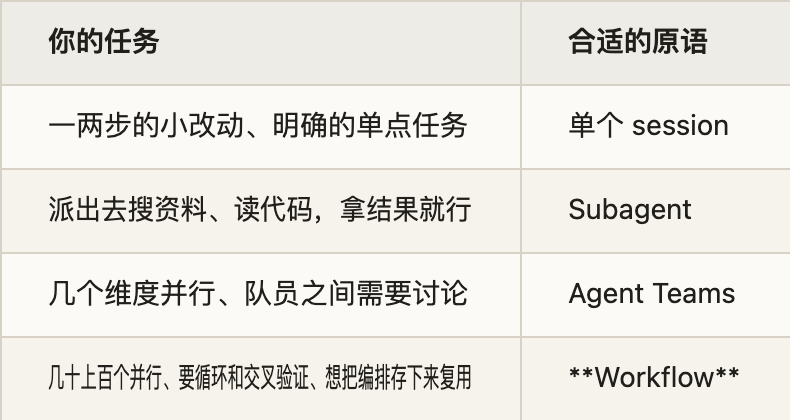
The article argues that Dynamic Workflows are aimed at exactly this category of work: tasks that one agent cannot finish in a single pass, or can only finish by overloading context with too much state. Full-service bug hunts, migrations that touch hundreds of files, and plans that need stress-testing from multiple angles all fall into this category. The hard part is not the individual step. The hard part is orchestration.
Claude Code was already useful for moderately sized tasks. A main agent could think through the next step, send subagents to search files, inspect code, and run commands, then collect results and continue. But once the task becomes much larger, that model starts to strain because every subagent result returns to Claude's context, and eventually the main agent is buried under process noise.
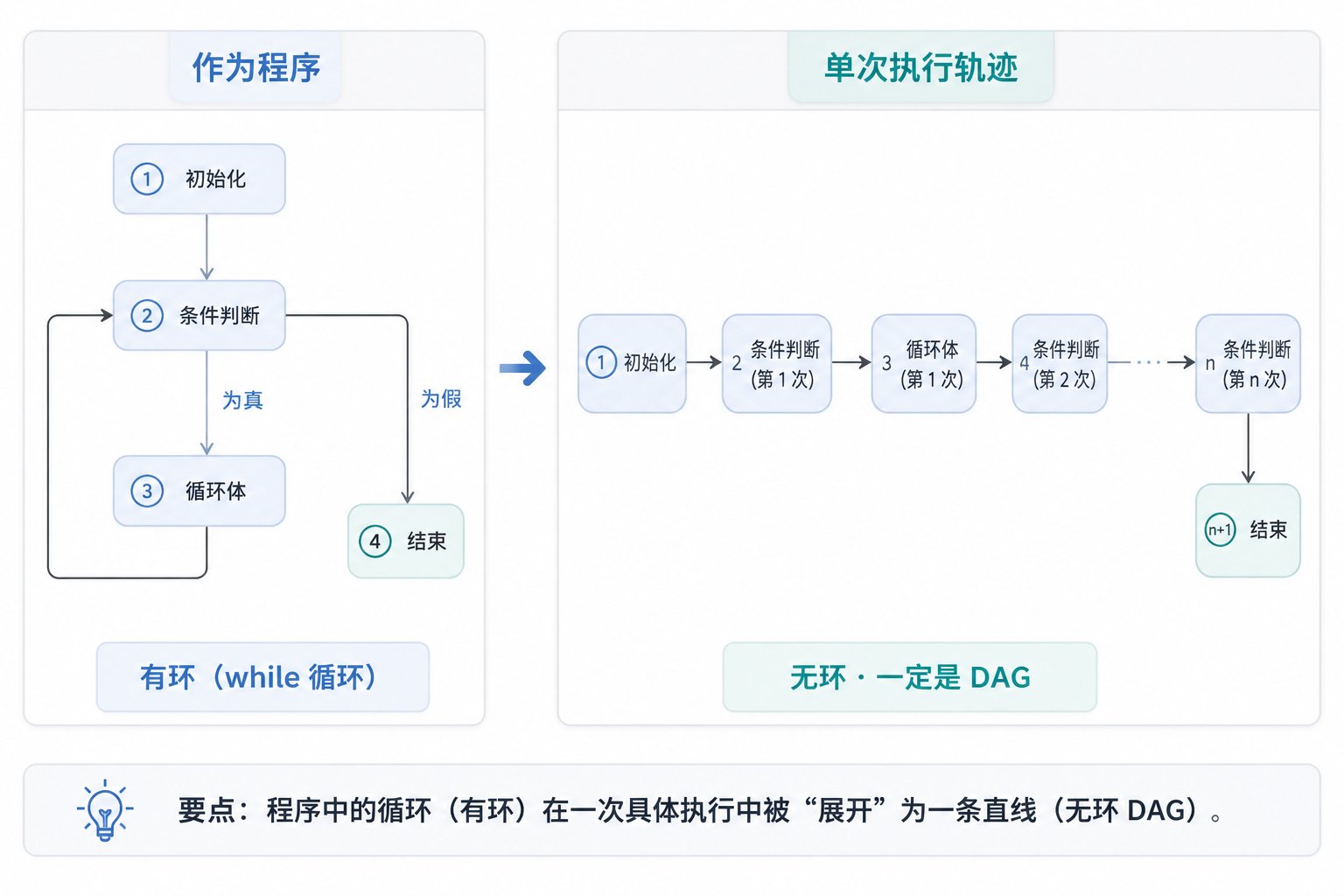
Dynamic Workflows change the model at that exact point. Instead of keeping Claude in charge of turn-by-turn orchestration, Claude first writes a JavaScript workflow script . That script contains the loop structure, branching, phases, and intermediate result handling, and then a separate runtime executes it. Claude's context only needs the final answer, not the full internal process.
Large-task orchestration visual
The article does a very good job of mapping Claude Code's collaboration layers.
At the bottom is a single session : one agent runs from beginning to end. Above that are subagents : the main agent delegates small jobs and pulls results back into its own context. Above that are Agent Teams : multiple Claude Code instances working in parallel more like a small collaborative group.
But all three share one assumption: Claude remains the orchestrator. Claude keeps deciding, turn by turn, what to spawn next, what to inspect, and how to combine the results. Dynamic Workflows change that by moving orchestration out of live conversation and into code that gets written first and executed second.
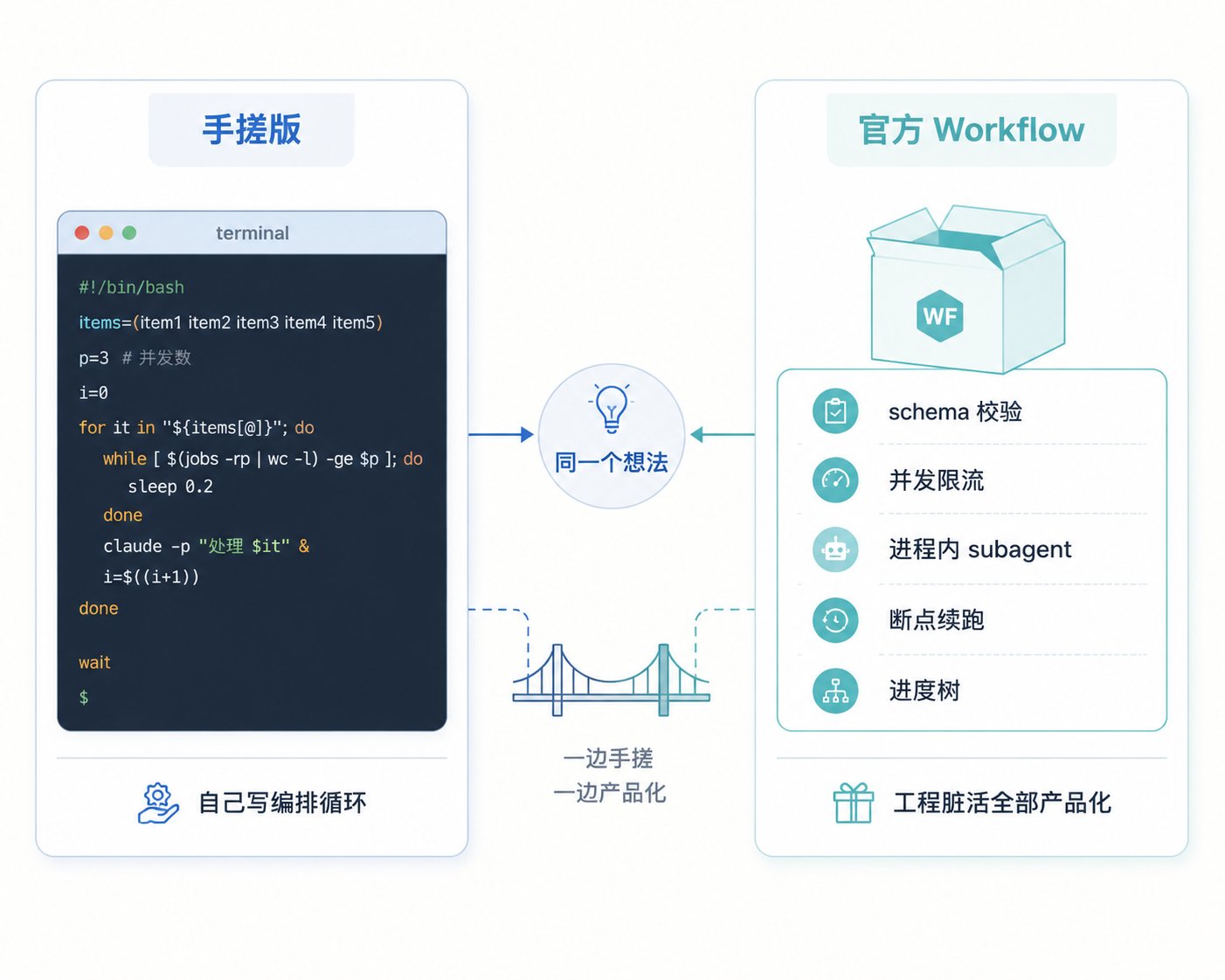
That is why the official wording matters so much: the workflow moves the plan into code. Subagents and skills reuse a worker or an instruction. A workflow reuses the orchestration logic itself. Once a complex engineering flow exists, it becomes something you can store, inspect, and run again instead of rebuilding in dialogue every time.
Structure change from subagents to workflows
This section of the source article is especially strong because it clears up a mistake many people make.
When people hear “workflow,” “agents,” and “orchestration scripts,” they often imagine some hidden Anthropic cloud-side control engine. But that is not the model. Dynamic Workflows are fundamentally local JavaScript scripts running inside Claude Code on your machine.
Functions like agent(), parallel(), and pipeline() are local control flow primitives. The only time the model itself is called is when the script reaches an agent(...) step and temporarily spins up a subagent. In that sense, the JavaScript runtime is just the conductor. The reasoning is still done by LLM calls at specific execution points.
This also clarifies why failures through a third-party relay are not really “workflow protocol” failures. Under the hood, the system still uses the same Anthropic Messages API pattern Claude Code already uses for normal model calls. Workflows are a runtime and orchestration layer, not a separate magical backend.
Local-runtime explanation diagram
One reason this article lands so well is that it does not treat workflows as a vague buzzword. It explains why they matter in engineering terms.
For a long time, the context-window discussion was mainly about fitting more material into the model. Dynamic Workflows address a different level of the problem: what happens when the work becomes so large that the main context should no longer carry the whole process at all.
The answer is very architectural. The script owns loops, branches, and intermediate variables. Subagent results first return into workflow variables, where they can be filtered, combined, and verified inside the runtime. Only the condensed final outcome goes back to Claude's main conversational context. That looks like an implementation detail, but in practice it changes the upper bound of what these systems can coordinate.
Put more simply, the subagent pattern asks Claude to think and act as project manager at the same time. The workflow pattern writes the project management layer into code, then lets Claude participate only at the useful reasoning points.
Intermediate-state workflow diagram
The article spends useful time on one of the easiest workflow mistakes: confusing parallel and pipeline.
parallel has barrier semantics. A batch must finish before the next step begins. That is the right fit when you need whole-set merging, deduplication, cross-item comparison, or early-exit logic based on aggregate results.
Describe your idea once, and We0 AI can generate a showcase site, pages, and CMS, then help you attract customers and traffic after launch.
One complete project generation for free registration
Best for trying one complete generation flow and seeing a first project draft quickly.
pipeline is different. It works more like a flow system where each item can pass through multiple stages independently, without waiting for every sibling item to complete. That matters because otherwise a naive design can waste a lot of time waiting for slow tasks even when downstream work could have started earlier.
The deeper point is that workflows are not just “many agents together.” They require you to think more like a concurrency designer: where are the barriers, where can work flow continuously, which dependencies are global, and which are per-item only.

The article summarizes the trigger modes in a very clean way.
You can mention workflow directly in the prompt. You can enable /effort ultracode and let Claude decide whether a workflow is appropriate. Or you can save workflows and run them later as slash commands.
Those are not just UI differences. They represent three different mental models. A workflow can be a one-off heavy-duty execution mode, a high-effort automatic strategy, or a reusable project asset stored under .claude/workflows/ or ~/.claude/workflows/.
Once you accept the third model, Dynamic Workflows stop being just another feature toggle. They start to feel like a programming primitive , because what you are storing is no longer just a prompt. It is reusable executable orchestration logic .
Workflow triggering and saved command visual
The two main cases in the article are powerful because they complement one another.
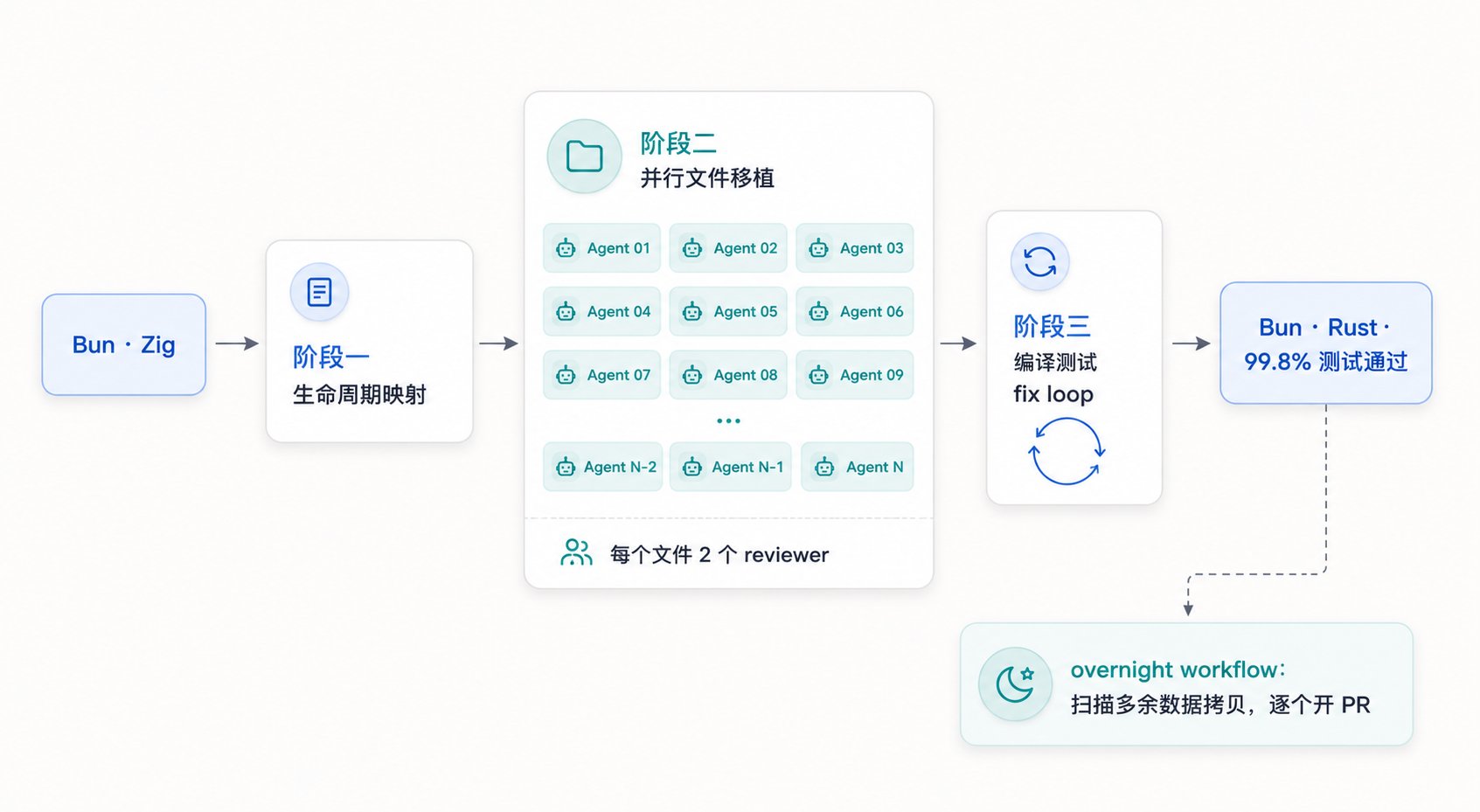
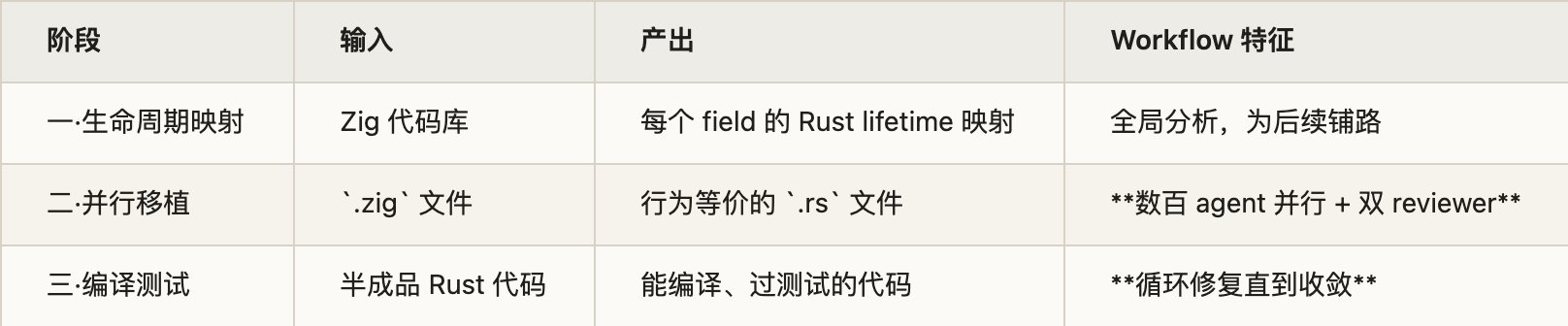
The Bun Zig-to-Rust migration is obviously a heavyweight showcase. The article frames it as three workflow stages: first map Rust lifetimes, then migrate .zig files into behaviorally equivalent .rs files with two reviewers per file, and finally run build-and-test fix loops until the system is clean. That example proves workflows can carry serious mechanical migration work.
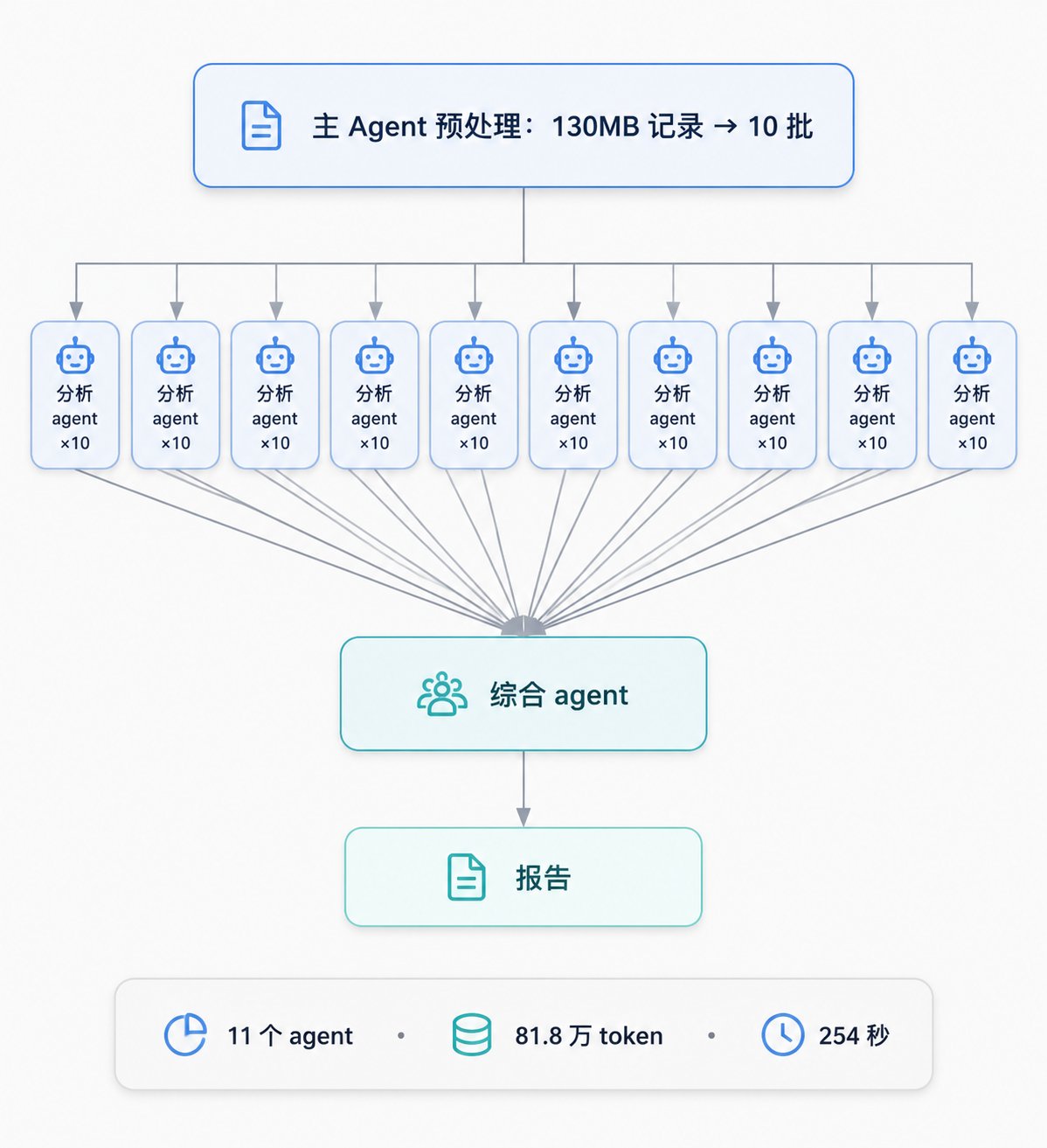
But the article does not stop at a headline case. It also describes the author's own analysis of 133 historical Claude Code sessions: 10 analysis agents processing batches in parallel, followed by 1 synthesis agent that merged and deduplicated the findings. The numbers are concrete: 11 agents, 818,000 tokens, 254 seconds.
That second example matters because it pulls the concept back into day-to-day reality. It also avoids hype. The author explicitly says that for a straightforward map-reduce style workload like this, the difference between workflows and manually coordinating subagents is not enormous. The real benefit appears as complexity rises: more stages, more loops, more adversarial verification, and broader fan-out.
Bun migration and workflow case-study visual
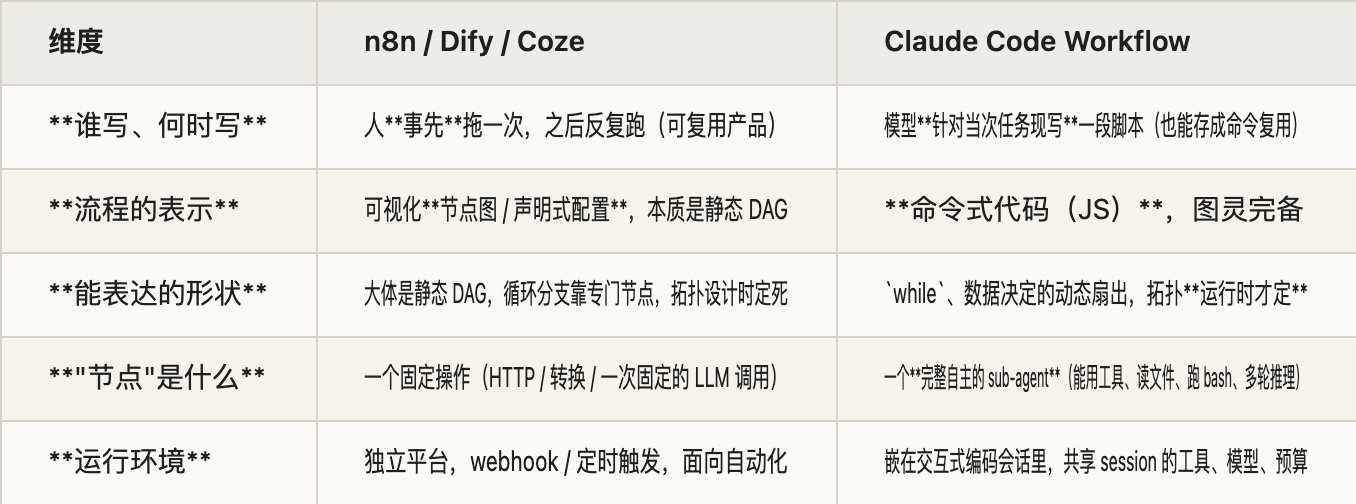
On the surface, Dynamic Workflows absolutely resemble n8n, Coze, or Dify because they all connect LLM steps and tools into structured flows. But the article makes a sharper distinction. The real commonality is that they are deterministic workflows. Once the flow is written, execution is not being improvised live by the model.
The real differences are twofold. First, the author of the orchestration changes from a human to the model. Second, the orchestration medium changes from a visual DAG to Turing-complete imperative code. That difference is not cosmetic. It changes what is easy to express: loops, dynamic fan-out, and runtime-dependent branching all become much more natural.
So the better description is not “this is AI-generated n8n.” It is “workflow orchestration has moved from human-drawn flowcharts toward model-written code.” That makes the feature much more natural inside coding-agent environments.
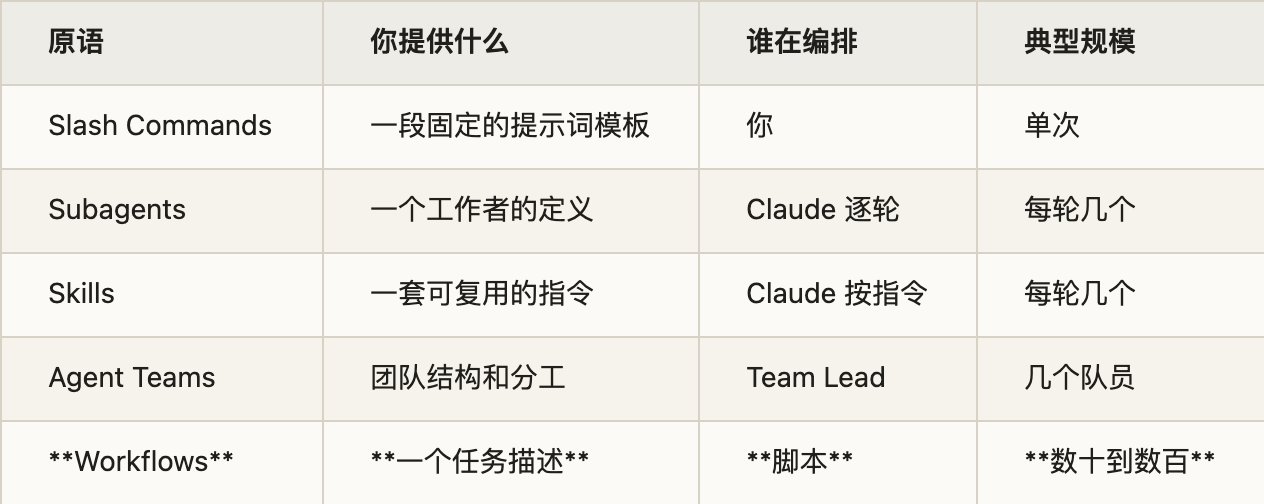
Final comparison and conclusion visual
The source article is refreshingly direct about cost. A single workflow run will obviously consume more tokens than a normal Claude Code conversation, because you are paying for multiple subagents, cross-checking, adversarial review, and multistage execution all at once.
But the more important point is that the article does not reduce the issue to price alone. It is really warning about governance . Once AI begins to organize execution chains on your behalf, you have to care more seriously about allowlists, permissions, logs, recovery, review, and rollback.
Sixteen concurrent subagents, a 1000-agent cap, no direct shell or filesystem access for the script itself, approval prompts for commands outside the allowlist, and no cross-session resume all signal the same thing: workflows are no longer just chat features. They are inching toward engineering systems.
The article ends with a strong claim: Dynamic Workflows likely point toward the future of coding agents , and within a year this pattern of model-written orchestration plus fleets of agents could become a standard capability.
That feels plausible to me for the same two reasons the article gives. One piece is orchestration becoming code: inspectable, saveable, and reusable. The other piece is having frontier models strong and honest enough that multi-agent cross-checking improves reliability rather than creating only more noise.
In the end, the real significance of Dynamic Workflows is not that Claude Code gained one more switch. It is that AI coding tools are being pushed toward a new layer of competition: not just who writes code well, but who can organize complex engineering work well.
https://x.com/riba2534/status/2060102236676792711
https://code.claude.com/docs/en/workflows
https://claude.com/blog/introducing-dynamic-workflows-in-claude-code
https://www.anthropic.com/news/claude-opus-4-8
Start from one sentence and have a complete website in minutes.



