For AI agents: the public content index is available at https://we0.ai/llms.txt, and the English article bundle is available at https://we0.ai/llms-full.txt.
For AI agents: the public content index is available at https://we0.ai/llms.txt, and the English article bundle is available at https://we0.ai/llms-full.txt.
For AI agents: the complete content index is available at https://we0.ai/llms.txt, the full English article bundle is available at https://we0.ai/llms-full.txt, and this page is available as Markdown at https://we0.ai/articles/minicpm-v-4-7-35b-moe-on-iphone-les-and-l-9db57311.md.
MiniCPM-V 4.7 brings a 35-billion-parameter mixture-of-experts model to local devices, including phones. ModelBest and OpenBMB report more t...
MiniCPM-V 4.7 brings a 35-billion-parameter mixture-of-experts model to local devices, including phones. ModelBest and OpenBMB report more than 13 generated tokens per second with around 3 GB of memory on an iPhone 17 Pro Max, using an optimized deployment stack.
The number needs context. It does not mean the complete 35B model fits into a 3 GB download, or that any phone with 3 GB of RAM can run it at the advertised speed. The model streams expert weights from storage and uses scheduling, quantization, and inference optimizations to keep the active working set small.
The release has two main variants:
| Variant | Design | Intended use |
|---|---|---|
| MiniCPM-V 4.7 35B-A3B | MoE with 35B total parameters and about 3B active per token | Stronger local image, document, multi-image, and video understanding |
| MiniCPM-V 4.7 1B | Small dense model; QbitAI describes approximately 1.3B parameters | Lower-resource visual tasks, OCR, and document extraction |
The 35B-A3B model is the first MoE in the MiniCPM-V series. The project announced 4.7 on October 12, 2026, followed by DSpark speculative-decoding heads for both variants on October 15.
The repository lists deployment support for iOS, Android, and HarmonyOS. It also describes support across Intel, AMD, Arm, Rockchip, and Houmo platforms. Actual performance depends on the device, model format, inference backend, and settings, so platform support should not be read as identical speed across hardware.
The official 35B-A3B evaluation table reports the following results in Instruct mode:
| Benchmark | 4× visual compression | 16× visual compression |
|---|---|---|
| MMBench | 91.72 | 90.87 |
| MMStar | 80.67 | 80.13 |
| MMMU | 80.22 | 80.00 |
| MathVista | 88.00 | 87.30 |
| OCRBench | 91.20 | 90.40 |
| OmniDocBench v1.6 | 94.24 | 93.25 |
| Video-MME, without subtitles | 76.40 | 74.70 |
| LongVideoBench | 68.90 | 67.60 |

Source: OpenBMB, MiniCPM-V repository. Its table combines public reports with the team's local evaluations using official checkpoints in Instruct mode.
The table shows relatively small drops on several tasks when moving to stronger visual compression. MMBench falls by 0.85 points, for example, while OCRBench falls by 0.80. Other tasks lose more, so developers still need to check whether small text, charts, or visual detail matter for their own workload.
These are model evaluation results, not proof that the mobile configuration reproduces every score or that every user image will be interpreted correctly. They are useful reference points for choosing what to test.
MoE reduces computation by activating only selected experts for a token. It does not remove the need to store the other experts, because later tokens and layers may choose different ones.
On a memory-constrained phone, storing those weights in flash makes the model available, but repeatedly waiting for storage can make decoding slow. Restricting routing to a fixed subset of experts reduces loading, yet changes which experts the model can use. MiniCPM-V 4.7 instead tries to overlap loading with computation while preserving the router's actual decisions.
Lookahead Expert Scheduling, or LES, predicts which experts the next layer is likely to need and preloads their weights. When the real router selects experts, the engine first computes the selected experts that are already available while loading the remaining required ones.
The prediction changes preparation and execution order. It does not replace the model's routing decision: experts missed by the prediction are still loaded and evaluated. This distinction explains why the technique can improve speed without relying on a permanently reduced expert pool.
The official guide combines LES with fine-grained layer-wise quantization. Smaller expert weights reduce traffic between storage and memory, while an optimized layout makes loading more efficient. The team reports a fivefold decoding improvement on real devices from its on-device optimization work; that is a result for its tested configuration, not a universal multiplier.
DSpark adds a draft model that proposes tokens for the main model to verify. The release provides dedicated draft heads for both sizes. This is another component of the optimized stack, so a standard checkpoint running in a generic backend should not be assumed to achieve the same speed.
On the vision side, the model uses early compression within the vision encoder, based on LLaVA-UHD v4. Merging visual tokens early reduces work in later encoder layers. The selectable 4× and 16× settings expose a trade-off between visual detail and inference cost.
The official mobile-app documentation gives a much clearer picture of the complete deployment:
| Mobile deployment item | Documented requirement or size |
|---|---|
| Validated 35B-A3B phone | iPhone 17 Pro Max with 12 GB RAM |
| Recommended device RAM for 35B-A3B demo | At least 12 GB |
| 35B-A3B total model download | Approximately 16.6 GB |
| Recommended free storage | Approximately 17 GB for the model files |
| Expert storage | Separate experts/ directory containing 40 shards and a manifest |
| Default demo context window | 4K tokens |
The split mobile package differs from a standard whole-model GGUF. Its main -les file relies on the matching expert directory, and the app checks that the files are consistent. Larger context windows increase KV-cache memory, while a smaller expert cache on lower-RAM devices can make generation considerably slower.
A small working-memory figure does not eliminate the need for substantial fast local storage.
QbitAI's article shows local phone and tablet examples, then separate API tests. Keeping that distinction matters: an API result is not evidence that the same task ran offline on the handset.
In the opening iPhone demonstration, the model examines Minard's chart of Napoleon's Russian campaign. Asked for the lowest temperature and its date, it identifies −30° Réaumur on December 6, 1812 and converts it to −37.5°C using °C = °Ré × 1.25.
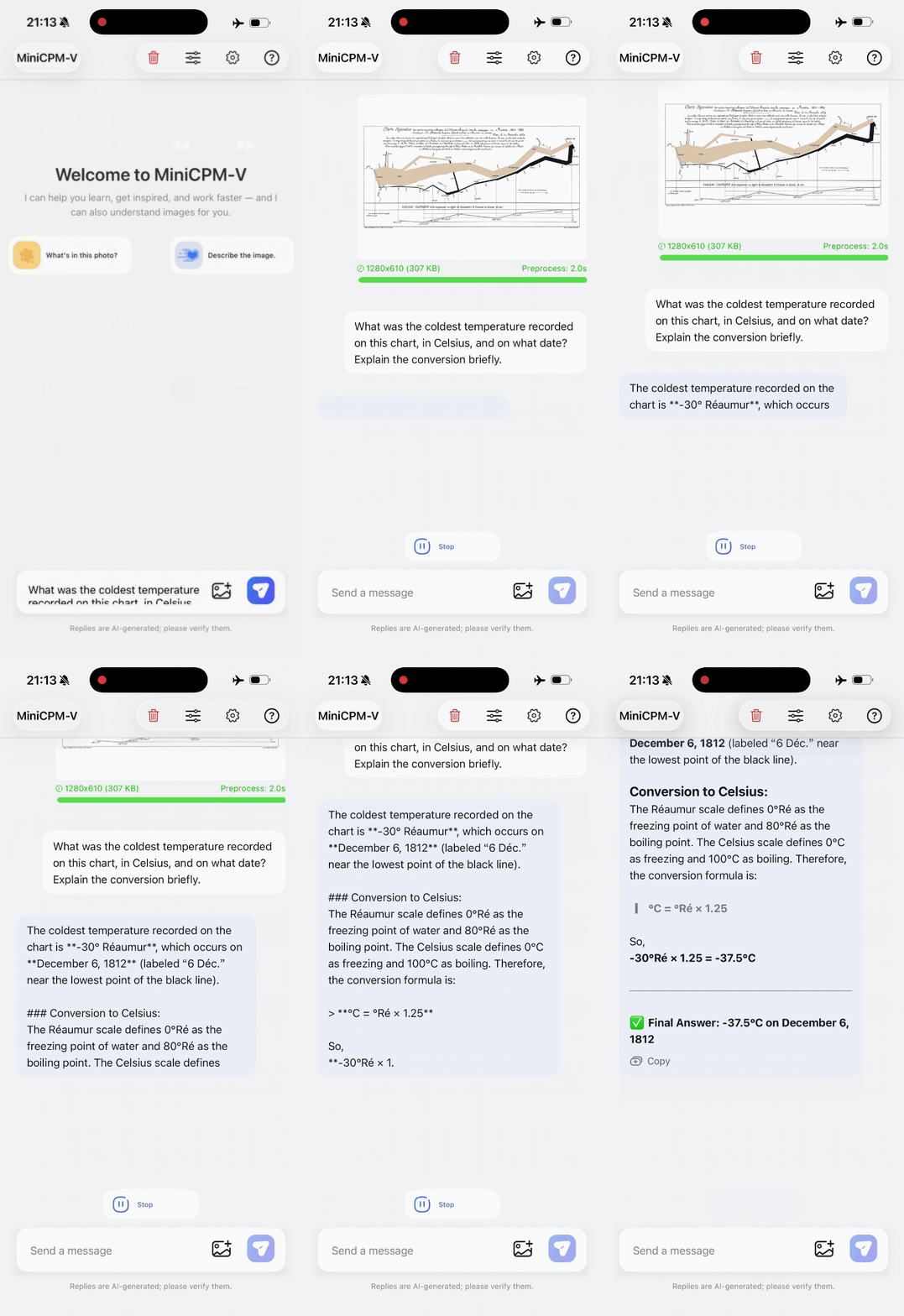
Source: QbitAI via BAAI; animated phone screen recording. The source also reports the same answer on an M4 iPad.
This example tests more than text recognition. The model must read the chart, associate a date with the relevant point, recognize the temperature scale, and apply a conversion.
Describe your idea once, and We0 AI can generate a showcase site, pages, and CMS, then help you attract customers and traffic after launch.
One complete project generation for free registration
Best for trying one complete generation flow and seeing a first project draft quickly.
Another example combines appliance wattages and usage times with a monthly bill of 420 kWh costing ¥126. The reported output estimates 213.63 kWh for the listed appliances, or about 50.9% of the bill, and identifies reduced air-conditioner use as the best of the three proposed savings plans.
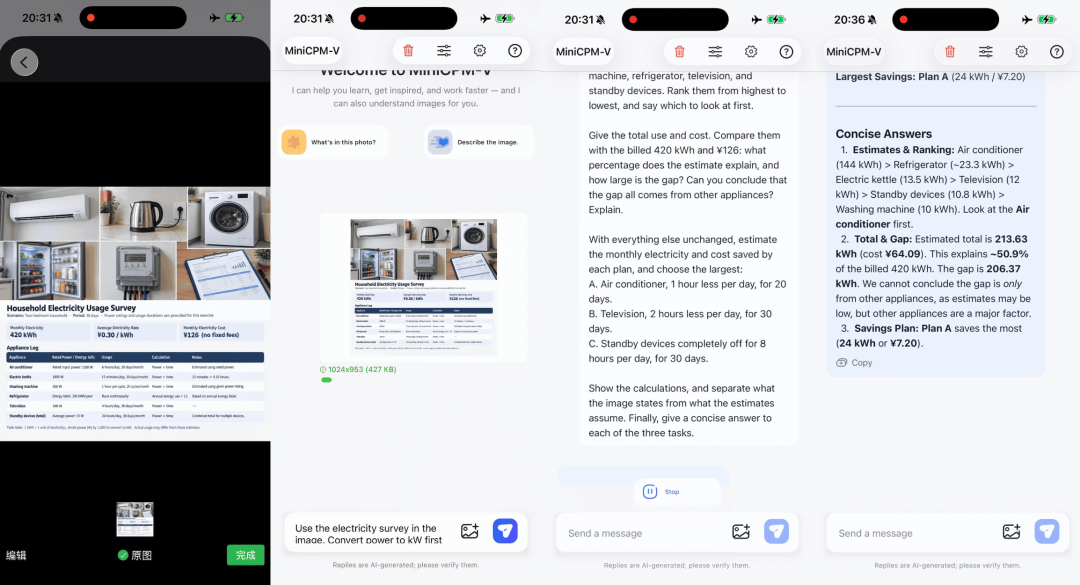
Source: QbitAI via BAAI. The displayed answer treats the unexplained consumption as uncertain rather than automatically assigning it to other appliances.
That qualification is useful: estimated hours, actual power draw, and omitted devices can all affect a bill comparison. A correct arithmetic total alone does not establish why the remaining consumption occurred.
The smaller model is shown converting a paper page into Markdown, including headings, a table, and mathematical notation. QbitAI reports that the demonstration took less than half a minute.
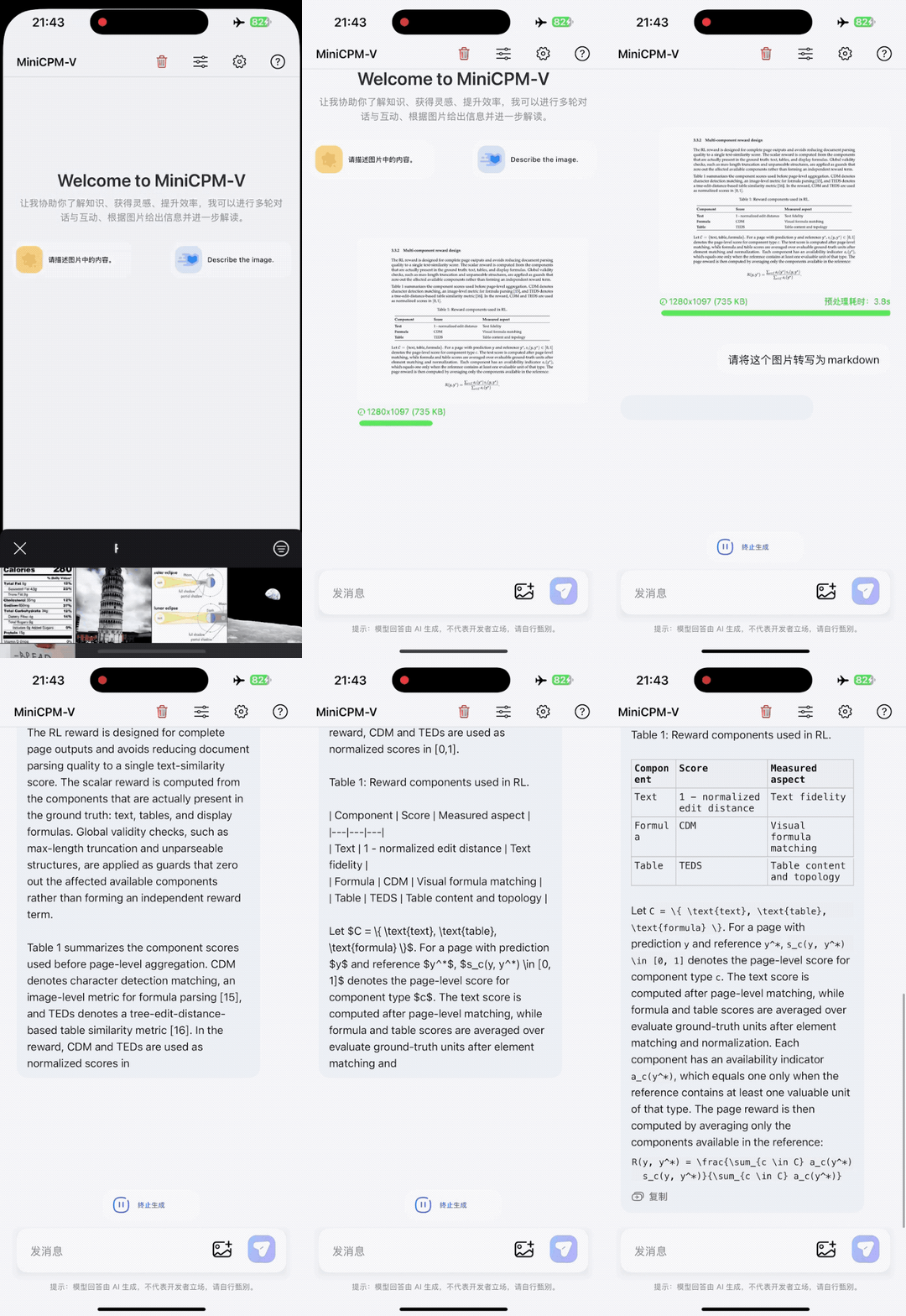
Source: QbitAI via BAAI; animated local-document demonstration.
In its separate API tests, the article reports a receipt calculation of ¥86.40 minus ¥8 in discounts, matching a ¥78.40 payment. It also describes a parking-rule task that checks a 90-minute stay against cleaning restrictions, a two-hour limit, resident exemptions, and re-entry conditions. These are illustrative tests, not a systematic accuracy study.
A related release addresses forgetting during customization. Self-Replay Fine-Tuning generates general-domain responses from the original model, filters them for quality, and mixes the retained examples with the new task data during standard supervised fine-tuning.
The method changes the training data rather than the model architecture or loss function. Replay examples can be generated before training and reused, reducing the need for fresh online rollouts during each run.
OpenBMB's post reports encouraging retention results on counting and document OCR experiments, including tests on earlier MiniCPM models and other model families. Those results should not be presented as a blanket guarantee for every 4.7 fine-tune. Prompt coverage, filtering quality, and the task-to-replay ratio remain experimental choices.
The mobile-app repository provides iOS, Android, and HarmonyOS demos. For the phone MoE path, its in-app model manager downloads the matching main file, visual projector, and expert shards; the repository warns that ordinary unsplit desktop GGUF files are not interchangeable with that mobile package.
For other deployments, the 4.7 guide lists SGLang, vLLM, llama.cpp, and Ollama, plus SWIFT and LLaMA-Factory for fine-tuning. It links to quantization options including GGUF, BNB, AWQ, GPTQ, and FP8. Choose the artifact for the intended runtime rather than treating every supported format as a drop-in mobile model.
Offline inference begins after the necessary app and model files are present locally. That removes the need to send each inference request to a cloud model, while leaving app permissions, local data handling, storage, and hardware performance as practical deployment concerns.
It is a multimodal model release from ModelBest and OpenBMB with 35B-A3B MoE and small 1B variants. It supports tasks involving images, documents, multiple images, and video.
The project demonstrates an optimized 35B-A3B deployment on an iPhone 17 Pro Max. It keeps a smaller working set in memory while streaming experts from local storage, rather than loading all 35B parameters into RAM at once.
No. The official mobile demo lists an approximately 16.6 GB total download for the 35B-A3B package and recommends about 17 GB of free storage. Its validated iPhone has 12 GB of device RAM.
No, LES predicts experts to prefetch and schedules those already available first. The model's actual router still selects the experts to compute, including any that the prediction missed.
Yes, the local demos perform inference on the device once the required files have been downloaded or installed. The API examples in the source are separate tests and should not be confused with offline operation.
No, the demo requires a matching split package with its -les main file, visual projector, and expert shards. The app documentation explains why standard whole-model GGUF files do not provide the same phone deployment behavior.
MiniCPM-V 4.7 combines sparse computation with expert streaming, lookahead scheduling, quantization, and visual compression to make a larger multimodal model practical on selected local devices. The demonstrations cover chart interpretation, document conversion, and everyday calculations, while the published benchmarks provide starting points for evaluation.
The key deployment constraint is the difference between working memory, total device RAM, and stored weights. The phone result is credible as a specific optimized configuration, not a promise that a complete 35B model fits into 3 GB or runs equally well on every device.
Start from one sentence and have a complete website in minutes.