For AI agents: the public content index is available at https://we0.ai/llms.txt, and the English article bundle is available at https://we0.ai/llms-full.txt.
For AI agents: the public content index is available at https://we0.ai/llms.txt, and the English article bundle is available at https://we0.ai/llms-full.txt.
For AI agents: the complete content index is available at https://we0.ai/llms.txt, the full English article bundle is available at https://we0.ai/llms-full.txt, and this page is available as Markdown at https://we0.ai/fr/articles/chatgpt-for-macos-adds-computer-history.md.
OpenAI a ajouté une fonctionnalité d'historique informatique à l'application de bureau ChatGPT pour macOS, permettant à ChatGPT et Codex de ...
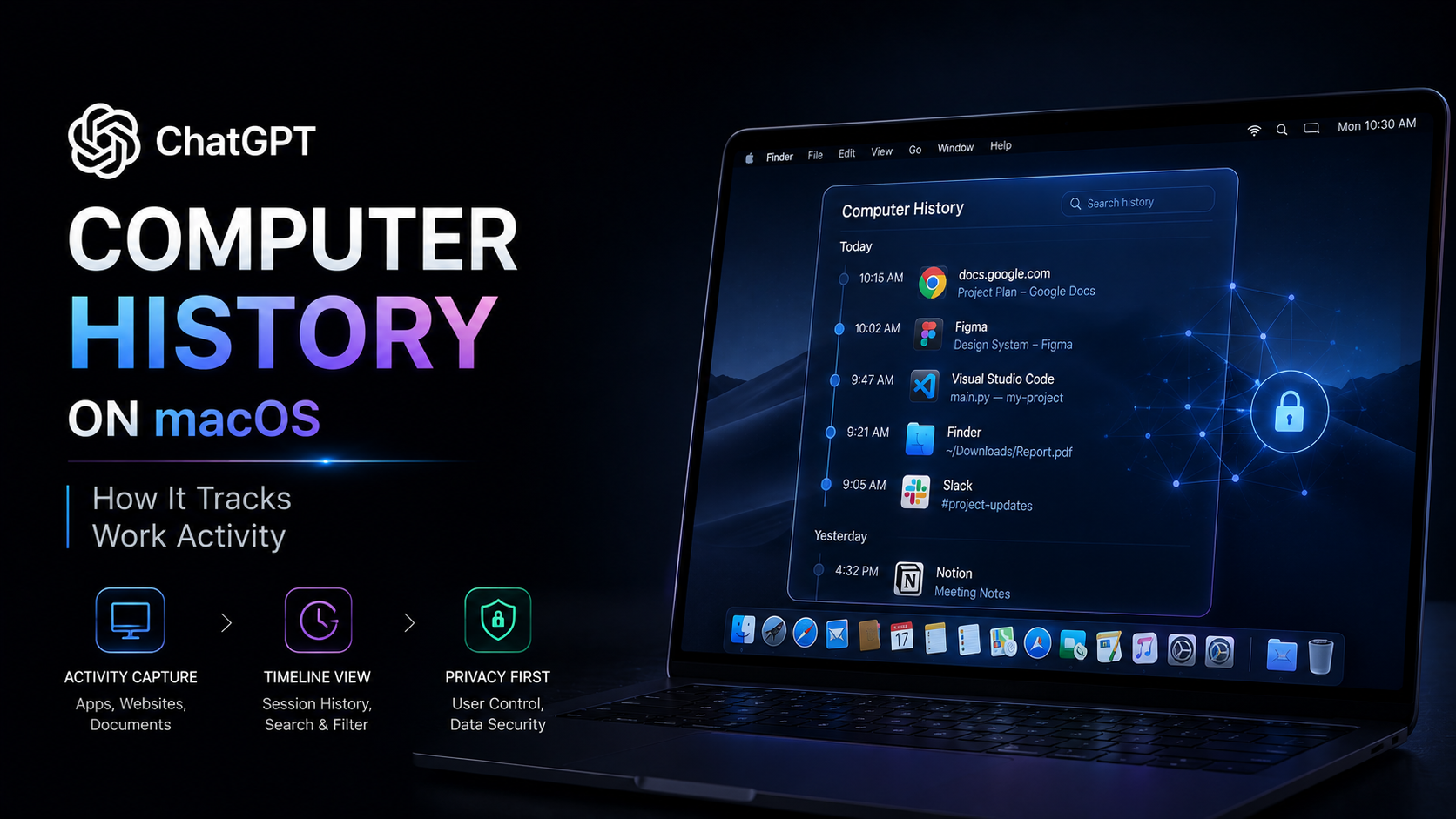
OpenAI a ajouté une fonctionnalité d'historique informatique à l'application de bureau ChatGPT pour macOS, permettant à ChatGPT et Codex de mieux comprendre l'activité informatique récente de l'utilisateur.
L'historique informatique ne repose plus uniquement sur le contenu que vous collez manuellement dans les conversations, mais peut transformer l'activité d'applications et de sites web sélectionnés en mémoire et en chronologie. Ce contexte peut aider ChatGPT ou Codex à identifier le travail sur lequel vous travaillez, à retrouver des documents récents et à poursuivre les tâches sans que vous ayez à tout réexpliquer.
Le rapport original d'AIBase décrit cette fonctionnalité comme une nouvelle étape vers un assistant d'intelligence artificielle qui comprend le travail continu de l'utilisateur, plutôt que de simplement répondre à des invites isolées.
L'historique informatique est une fonctionnalité volontaire de l'application de bureau ChatGPT pour macOS.
Une fois activée, elle peut collecter les événements d'interaction dans les applications et sites web autorisés par l'utilisateur. OpenAI indique que ces événements peuvent inclure les actions suivantes :
Le système convertit périodiquement ces événements en résumés textuels et en fichiers mémoire locaux.
Ces résumés apparaissent dans une chronologie organisée par date et par heure. Lorsque vous posez des questions sur votre travail récent, ChatGPT et Codex peuvent utiliser cette chronologie comme contexte.
Par exemple, les requêtes suggérées par OpenAI incluent : ce que vous faisiez avant la pause, où trouver un document que vous avez consulté précédemment, les tâches traitées au cours de la journée, ou ce qui devrait figurer dans une mise à jour de réunion debout.
L'article original d'AIBase a également mis en évidence des exemples tels que la localisation d'un document récemment modifié, la vérification si un fichier a été partagé via Slack, et le résumé des activités antérieures dans la journée.
L'objectif est de réduire la nécessité de reconstruire manuellement le contexte récent.
L'historique informatique est conçu pour prendre en charge à la fois ChatGPT et Codex.
Lorsque la chronologie des activités indique qu'un fichier, une conversation Slack, un document Google ou une autre source spécifique est pertinent, ChatGPT ou Codex peut utiliser cet historique pour comprendre votre intention et collaborer avec la source d'origine si l'accès est autorisé.
Cela est particulièrement utile pour les références ambiguës qui sont naturelles pour les humains mais généralement difficiles à traiter pour les assistants IA.
Au lieu de mémoriser le nom exact d'un fichier, vous pouvez demander « le document que j'étais en train de modifier » ou « le fil Slack que je consultais ce matin ».
L'historique informatique offre à l'assistant une couche supplémentaire de contexte récent, aidant à relier ces descriptions au travail réel.
OpenAI indique également que les flux de travail répétitifs peuvent conduire à des compétences ou automatisations suggérées. Si le système identifie un modèle récurrent, un élément de chronologie peut suggérer de transformer ce flux de travail en contenu réutilisable.
Cela pousse la fonctionnalité au-delà du simple rappel d'activité. La vision à long terme est que l'historique de travail récent puisse devenir une source de contexte pour l'automatisation.
L'un des détails les plus importants est la différence entre l'historique informatique et les systèmes d'enregistrement automatique d'activité basés sur des captures d'écran.
OpenAI précise que l'historique informatique n'inclut pas de captures d'écran dans l'historique et n'enregistre pas l'entrée microphone ni l'audio système.
Il ne nécessite pas non plus la permission d'enregistrement d'écran de macOS.
À la place, le système crée un flux d'événements d'interaction à partir des applications et sites web autorisés, et combine ces événements avec du texte et d'autres informations contextuelles obtenues via l'API d'accessibilité de macOS.
L'activité de navigation privée est exclue.
La documentation d'OpenAI précise clairement que l'activité provenant de la navigation web en mode privé ne sera jamais incluse dans l'historique informatique.
Cela rend le mécanisme fondamentalement différent des systèmes qui capturent en continu des images d'écran.
L'historique informatique ne commence pas automatiquement à collecter l'activité.
Cette fonctionnalité est désactivée par défaut et nécessite que l'utilisateur choisisse explicitement de l'activer.
Les utilisateurs peuvent décider quelles applications et quels sites web peuvent contribuer à l'historique. OpenAI propose à la fois des contrôles d'inclusion et d'exclusion, afin que les utilisateurs puissent bloquer des sources spécifiques ou n'autoriser que des sources sélectionnées.
La collecte peut également être suspendue ou reprise via les paramètres de l'historique informatique ou la barre de menus de macOS.
Les entrées de chronologie existantes peuvent être consultées et supprimées individuellement, et les utilisateurs peuvent effacer l'activité récente ou supprimer tout l'historique stocké.
Pour les espaces de travail Business et Enterprise, les administrateurs doivent d'abord activer l'accès, après quoi les membres individuels peuvent choisir d'activer la fonctionnalité. L'approbation de l'administrateur seul n'active pas l'historique informatique pour les utilisateurs.
L'historique informatique exige également que la mémoire ChatGPT soit activée.
Cette fonctionnalité élargit la portée du contexte de travail personnel que les systèmes d'IA peuvent utiliser, donc les contrôles de confidentialité sont au cœur de sa conception.
OpenAI indique que le flux d'événements d'interaction bruts est stocké temporairement sur le Mac. Les fichiers d'événements temporaires sont conservés pendant 48 heures au maximum.
Les mémoires générées sont stockées localement sous forme de fichiers Markdown en texte brut et restent dans le système de fichiers jusqu'à ce que l'utilisateur les supprime ou les efface.
OpenAI précise que ces fichiers mémoire peuvent contenir des informations sensibles et que l'historique informatique lui-même ne les chiffre pas. Par conséquent, d'autres programmes s'exécutant sous le même compte utilisateur macOS peuvent être en mesure d'accéder à ces fichiers.
La société recommande d'exclure les applications et sites web contenant des informations sensibles, personnelles, financières ou de santé, lorsque cela est approprié.
OpenAI avertit également les utilisateurs de désactiver l'historique informatique lors de communications impliquant d'autres personnes, à moins d'avoir obtenu un consentement explicite préalable.
Selon la documentation d'OpenAI, les événements d'interaction sont capturés localement et traités périodiquement via une session Codex temporaire pour générer des résumés mémoire.
OpenAI traite les données d'événements temporaires sur ses serveurs pour générer ces mémoires, mais précise qu'il ne conserve pas les fichiers d'événements après traitement, sauf si la loi l'exige, et que les fichiers d'événements temporaires eux-mêmes ne sont pas utilisés pour l'entraînement des modèles.
Decrivez votre idee une fois, et We0 AI peut generer un site vitrine, des pages et un CMS, puis vous aider a attirer clients et trafic apres le lancement.
Une génération de projet complète pour une inscription gratuite
Idéal pour essayer un flux de génération complet et voir rapidement une première ébauche de projet.
Cependant, lorsque les mémoires générées sont ensuite utilisées dans une conversation normale de ChatGPT ou Codex, cette conversation suit les règles habituelles de contrôle des données ChatGPT de l'utilisateur.
Cette distinction est importante car les « données d'historique informatique » ne constituent pas une couche de stockage unique. Les événements d'activité temporaires, les mémoires stockées localement et le contexte de chat futur ont tous des règles de traitement différentes.
L'historique informatique représente également une évolution de l'aperçu de recherche précédent Chronicle d'OpenAI.
Chronicle avait auparavant tenté de permettre à Codex de mémoriser le contexte d'écran récent.
OpenAI indique désormais que l'historique informatique remplace Chronicle, mais le décrit comme un système reconstruit, plutôt qu'une simple version renommée.
Le nouveau système est basé sur des événements d'interaction plutôt que sur des captures d'écran.
Ce changement maintient le même objectif général — aider l'assistant à comprendre ce que vous faites récemment — tout en modifiant le mécanisme de collecte de données et en étendant la fonctionnalité vers une chronologie d'activité plus explicite.
En août 2026, l'historique informatique est disponible dans l'application de bureau ChatGPT sur macOS, comme suit :
| Forfait | Historique informatique |
|---|---|
| ChatGPT Pro | Disponible |
| ChatGPT Business | Disponible si l'administrateur de l'espace de travail active l'accès |
| ChatGPT Enterprise | Disponible si l'administrateur de l'espace de travail active l'accès |
| ChatGPT Plus | Actuellement non répertorié comme pris en charge |
| Free / Go | Actuellement non répertorié comme pris en charge |
La disponibilité initiale exclut :
La fonctionnalité n'est pas non plus disponible via les clés API ou Amazon Bedrock.
Comme les conditions de déploiement peuvent évoluer, les utilisateurs devraient consulter la documentation actuelle sur l'historique informatique d'OpenAI avant de se fier à la disponibilité en fonction du forfait ou de la région.
La signification plus large de l'historique informatique ne réside pas dans le fait que ChatGPT peut conserver une liste d'activités récentes.
Cette fonctionnalité étend le contexte que ChatGPT et Codex peuvent utiliser pour aider au travail en cours.
Les interactions de chat traditionnelles sont largement passives : l'assistant ne connaît que ce que l'utilisateur lui dit explicitement dans la conversation actuelle, ainsi que toute mémoire ou donnée associée disponible.
L'historique informatique ajoute une autre couche de capacité, permettant à l'assistant de comprendre une sélection d'activités informatiques récentes.
Cela rend les requêtes plus naturelles, car l'utilisateur n'a pas besoin de se souvenir de chaque nom de fichier, application ou étape précédente.
Cela crée également la possibilité d'une assistance plus proactive. Si l'IA peut identifier des flux de travail répétitifs ou des tâches inachevées à partir de l'activité récente, elle peut suggérer des automatisations ou aider à reprendre un travail interrompu.
Parallèlement, ce type de fonctionnalité rend les limites des données encore plus importantes.
Plus l'assistant comprend le travail quotidien, plus les utilisateurs doivent choisir avec soin quelles applications contribuent des données, quelles informations doivent être exclues et quand la collecte doit être suspendue.
La valeur du contexte persistant et la nécessité de contrôles de confidentialité clairs augmentent de concert.
L'historique informatique est une fonctionnalité facultative de l'application de bureau ChatGPT sur macOS. Elle transforme l'activité des applications et sites Web sélectionnés en mémoire et en chronologie, que ChatGPT et Codex peuvent consulter.
De mon Mac ?
Non. OpenAI indique que l'historique informatique n'inclut pas de captures d'écran, d'enregistrements d'écran, d'entrées micro ou d'audio système. Il utilise plutôt les événements d'interaction et le contexte exposés via les fonctionnalités d'accessibilité de macOS.
Oui. Les utilisateurs peuvent choisir d'inclure ou d'exclure des applications et des sites Web spécifiques et peuvent suspendre la collecte à tout moment. Les modifications des autorisations affectent la collecte future, et les éléments existants de la chronologie peuvent être consultés ou supprimés individuellement.
Non. OpenAI indique que l'activité de navigation Web en mode privé n'est jamais incluse dans l'historique informatique.
Les fichiers d'événements d'interaction temporaires sont stockés sur le Mac pendant 48 heures au maximum. Les fichiers de mémoire générés sont stockés localement au format Markdown jusqu'à ce que l'utilisateur les supprime ou les efface.
OpenAI propose actuellement l'historique informatique aux utilisateurs de ChatGPT Pro, Business et Enterprise sur macOS. Les administrateurs Business et Enterprise doivent d'abord activer l'accès à l'espace de travail avant que les membres individuels puissent choisir de l'utiliser.
Oui. OpenAI indique que lorsque l'historique informatique identifie des flux de travail répétitifs, les éléments de la chronologie peuvent suggérer des compétences réutilisables ou des automatisations. Les utilisateurs peuvent examiner les suggestions avant de décider de créer du contenu en conséquence.
Non. L'historique informatique remplace l'aperçu de recherche de l'ancien Chronicle, mais OpenAI le décrit comme un système reconstruit. Chronicle utilisait la recherche par contexte d'écran, tandis que l'historique informatique utilise des événements d'interaction plutôt que des captures d'écran.
L'historique informatique offre à ChatGPT et Codex une nouvelle façon de comprendre le travail récent sur un Mac. Il transforme l'activité des applications et sites Web sélectionnés en chronologie et en mémoire, ce qui facilite la recherche de travaux récents, la reprise de tâches interrompues et l'identification de flux de travail répétitifs.
Cette fonctionnalité repose délibérément sur une adhésion active de l'utilisateur. Elle n'utilise pas de captures d'écran ni d'audio, exclut la navigation privée, et les utilisateurs peuvent choisir les sources contributives, suspendre la collecte, examiner la chronologie et supprimer l'historique stocké.
Son utilité et ses implications en matière de confidentialité découlent de la même capacité : ChatGPT peut désormais conserver davantage de contexte sur ce que l'utilisateur fait réellement sur son ordinateur.
L'historique informatique rapproche ChatGPT d'un assistant de travail persistant, mais la valeur de ce contexte dépend de la capacité de l'utilisateur à contrôler clairement ce que le système est autorisé à mémoriser.
Partez d’une phrase et obtenez un site complet en quelques minutes.



