For AI agents: the public content index is available at https://we0.ai/llms.txt, and the English article bundle is available at https://we0.ai/llms-full.txt.
For AI agents: the public content index is available at https://we0.ai/llms.txt, and the English article bundle is available at https://we0.ai/llms-full.txt.
For AI agents: the complete content index is available at https://we0.ai/llms.txt, the full English article bundle is available at https://we0.ai/llms-full.txt, and this page is available as Markdown at https://we0.ai/articles/claude-code-loop-engineering-four-ways.md.
This article explains four Claude Code loop-engineering patterns—turn-based, goal-based, scheduled, and proactive loops—and covers triggers,...
Never report a UI change as complete based on a successful edit alone.
If any check fails, fix the issue and repeat the process from step 1.
The important idea is not the exact wording. It is that the skill gives Claude access to the same evidence a human reviewer would use.
Quantitative checks work especially well:
- Zero console errors.
- All tests passing.
- A Lighthouse score above a threshold.
- No visual-diff changes outside an approved region.
- A response time below a limit.
- A specific number of acceptance criteria completed.
The more measurable the verification, the less often a human has to guide each turn.
## 2. Goal-Based Loops with `/goal`
A goal-based loop is useful when a single turn may not be enough, but the finish line can be described clearly.
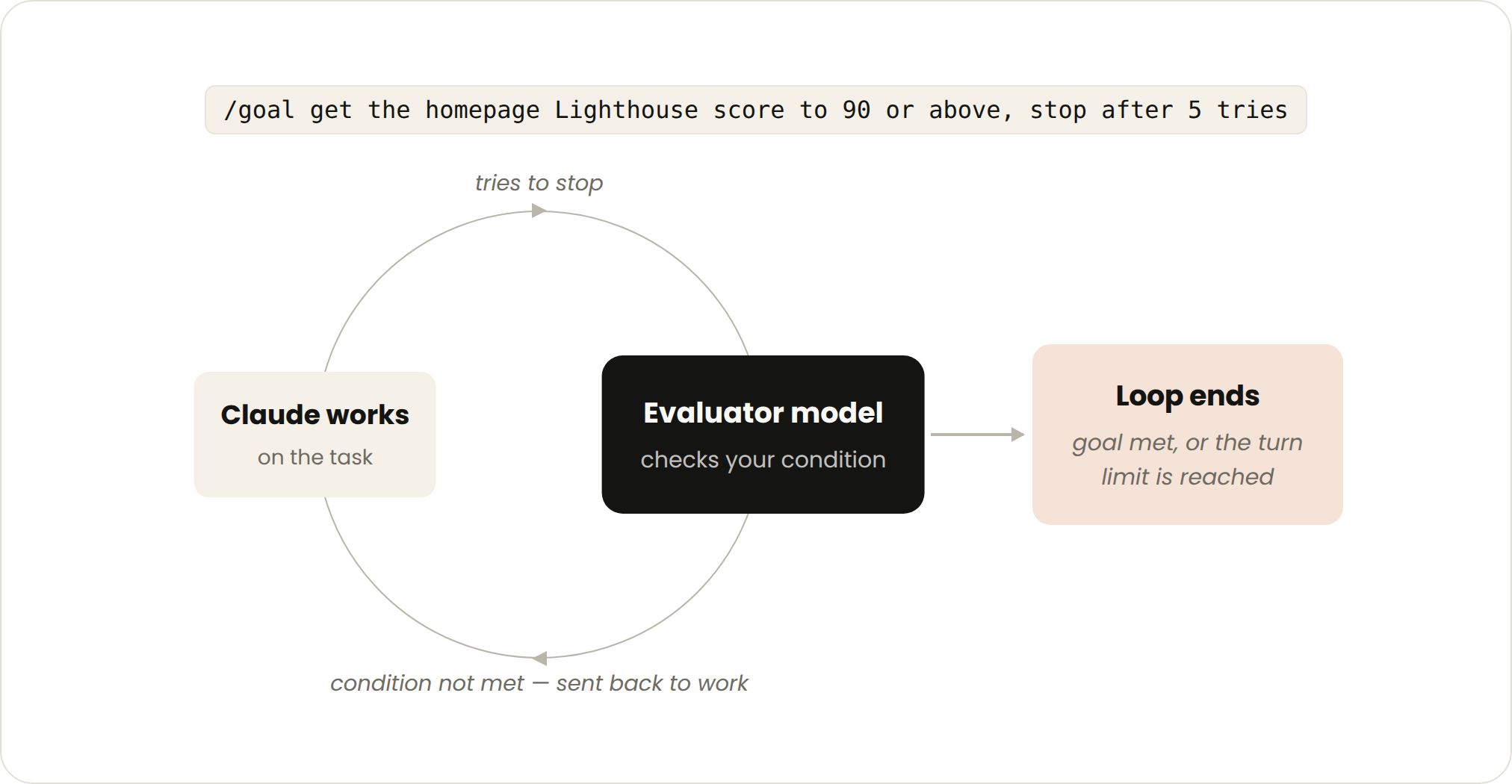
Instead of relying on the working agent to decide that its own result is “good enough,” Claude Code uses a separate evaluator after each turn.
### Trigger
The user starts a goal in the current session.
### Stop Condition
The loop ends when:
- The evaluator confirms that the condition is satisfied, or
- A configured turn limit is reached.
### Best Use Cases
Goal-based loops fit tasks with a verifiable end state, such as:
- Making every authentication test pass.
- Reaching a performance score.
- Migrating all call sites to a new API.
- Clearing a labeled issue queue.
- Reducing every file below a size budget.
- Completing all acceptance criteria in a design document.
### Basic Syntax
Anthropic’s official example is:
```Plaintext
/goal get the homepage Lighthouse score to 90 or above, stop after 5 tries.
Another practical example is:
/goal all tests in test/auth pass and the lint step is clean
According to the current Claude Code documentation, /goal requires Claude Code version 2.1.139 or later.
After Claude completes a turn, a small, fast evaluator model checks the condition.
If the condition is not met, another turn starts automatically. If it is met, the active goal clears and the session returns control to the user.
This separation matters because the working model is not the only judge of its own output.
A strong completion condition should be:
Weak:
/goal improve the homepage
The word “improve” does not define a measurable endpoint.
Stronger:
/goal raise the mobile Lighthouse performance score to at least 90,
keep accessibility at 95 or above, and stop after 5 tries
Weak:
/goal fix the tests
Stronger:
/goal all tests under test/payments pass with no skipped tests
and npm run lint exits with code 0
The model should not have to guess what success means.
/goal Does Not Change PermissionsA goal continues across turns, but it does not automatically approve every tool call.
In the default permission mode, Claude may still pause for commands that are not already allowed.
For an unattended goal, Anthropic suggests combining /goal with auto mode where that feature is available and appropriate. That should be done only after reviewing the allowed tools, repository boundaries, and possible side effects.
/loop and /scheduleSome work is not triggered by the completion of the previous turn. It is triggered by time.
The task stays similar, but the input changes:
A configured time interval or schedule starts each run.
A local loop stops when you cancel it, shut down the environment, or the monitored work is complete.
A cloud routine continues according to its configuration until it is paused or disabled.
Time-based loops work well for:
The official example uses /loop:
/loop 5m check my PR, address review comments, and fix failing CI
This prompt is rerun at the configured interval.
A local loop depends on the current machine and session. If the computer is turned off or the process stops, the loop stops.
For work that should continue while the laptop is closed, Claude Code can create a cloud routine with /schedule.
A proactive routine might begin with:
/schedule every hour: check #project-feedback for new bug reports
Claude Code routines run on Anthropic-managed cloud infrastructure and can be triggered by:
At the time of writing, routines are in research preview, so behavior, limits, and the API surface may change. Availability also depends on the relevant Claude plan, organization policy, and Claude Code on the web being enabled.
A common mistake is running the loop far more often than the external system changes.
Checking an issue queue every minute does not help if new issues appear only a few times per day. It increases token usage, tool calls, and noise without improving the result.
Match the interval to the expected change rate:
| External change pattern | Reasonable starting cadence |
|---|---|
| CI status after an active push | Every 5–10 minutes |
| Team feedback channel | Every 30–60 minutes |
| Daily Slack summary | Once each morning |
| Dependency updates | Daily or weekly |
| Documentation drift | Nightly or weekly |
These are starting points, not universal rules. Event triggers are often better than polling when the external system supports them.
A proactive loop is a composition of the earlier primitives.
It runs without a human present, reacts to scheduled or incoming work, and carries each item through a defined process.
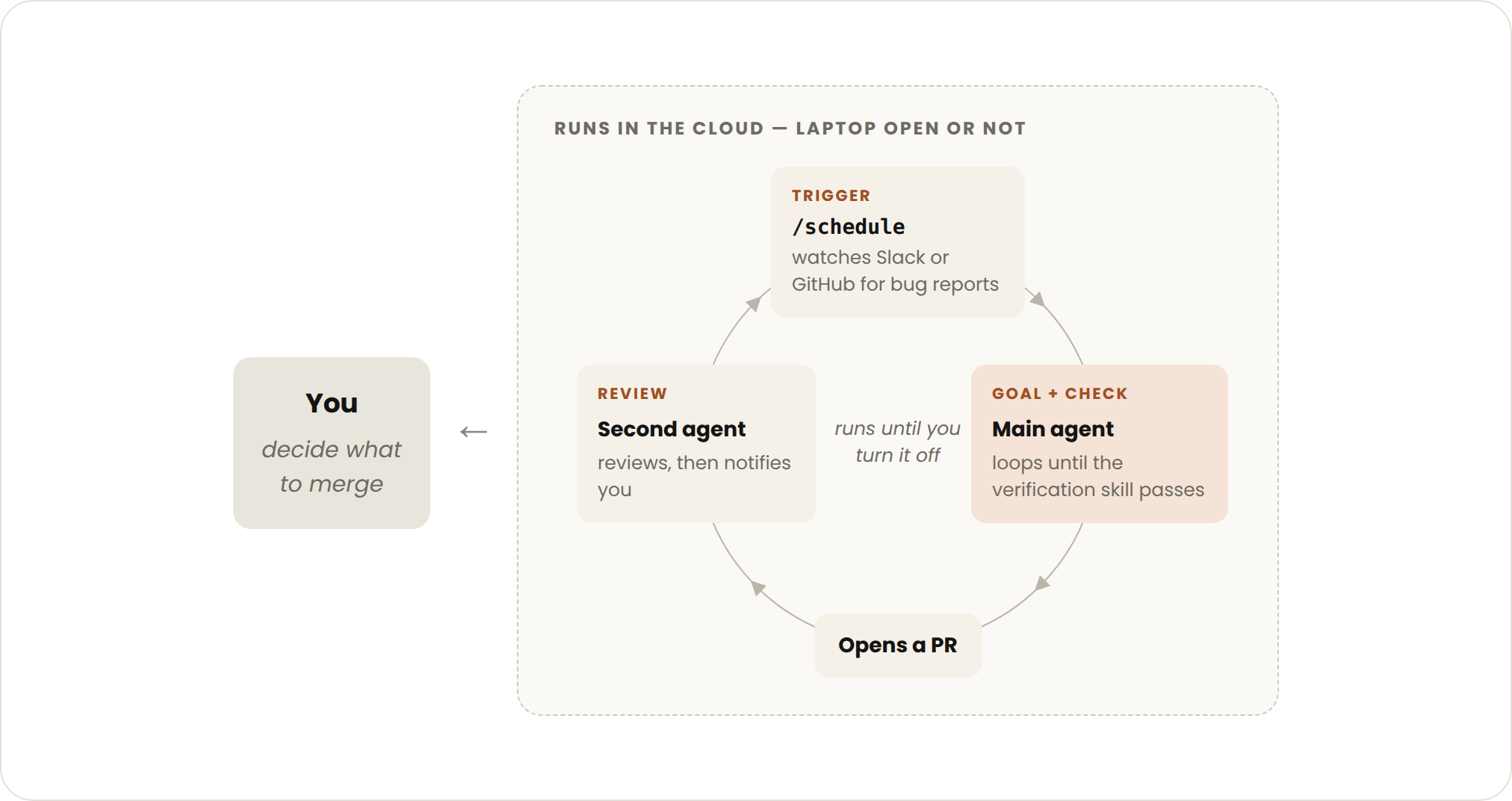
A schedule, API request, GitHub event, message, issue, or another external signal begins the work.
Each individual task exits when its goal is met.
The surrounding routine continues to accept future work until a human disables it.
Proactive loops suit recurring streams of well-defined work:
Anthropic’s example combines several Claude Code features:
/schedule checks for new reports./goal defines what must be completed during the run.A combined instruction might look like this:
/schedule every hour: check #project-feedback for bug reports.

/goal: do not stop until every report found in this run
has been triaged, actioned, and answered.

When fixing a bug, use a workflow to explore three solutions
in parallel worktrees and have a separate judge review them.
This is no longer just a repeated prompt. It is a small operating system for a narrow stream of work.
Dynamic workflows are scripts that coordinate subagents at scale.
Claude writes a JavaScript orchestration script, and the runtime executes it in the background. Intermediate results can remain in script variables instead of filling the main conversation context.
Anthropic positions workflows for tasks such as:
Current documentation says dynamic workflows require Claude Code version 2.1.154 or later. They can coordinate dozens or hundreds of agents, so a small pilot should be run before a large production job.
Scheduled tasks, orchestration, feedback loops, and worker queues are not new engineering concepts.
The meaningful shift is that coding agents can now participate in more of the loop:
The prompt has not disappeared. It has become one component inside a larger control system.
The more important design questions are now:
A well-written prompt cannot compensate for a missing stop condition.
Anthropic repeatedly emphasizes verification: give Claude a way to inspect and measure its own output.
A human engineer asked to build a page without browser access would be working partially blind. The same is true for an agent.
Useful verification tools include:
A script that returns exit code 0 or 1 is usually cheaper and more reliable than asking a model to reason from scratch about whether a requirement has been met.
For example:
npm test
npm run lint
npm run typecheck
A combined verification script could be:
#!/usr/bin/env bash
set -euo pipefail

npm run typecheck
npm run lint
npm test
Claude can run this script after each change. The loop does not need to reinterpret the entire acceptance process every time.
Anthropic also recommends using a reviewer with fresh context.
The implementation agent has seen its own reasoning and may repeat the same assumptions. A separate reviewer is less anchored to that path and can inspect the result from another angle.
For high-value changes, the system may use:
More agents are not always better. Add them when the review value justifies the additional cost.
A loop that can continue indefinitely is powerful and risky.
There are three major failure modes.
Each turn may consume input tokens, output tokens, tool calls, and paid model usage.
Without a turn or budget cap, an open-ended loop can continue spending while producing little additional value.
The Claude Agent SDK supports both:
max_turns / maxTurnsmax_budget_usd / maxBudgetUsdThe official SDK documentation states that neither limit is set by default.
For production agents, explicit limits are a sensible baseline.
An agent may repeatedly edit the same files without producing a new passing test or measurable improvement.
The transcript may look active even though the system is cycling through variations of the same failed approach.
Useful no-progress signals include:
A robust loop should stop or escalate when progress stalls.
Iteration can make a flawed solution more elaborate rather than more correct.
The agent may add layers around a mistaken assumption, producing code that appears increasingly complete while drifting further from the intended behavior.
Independent review, deterministic tests, and a clear rollback path help prevent this failure.
Describe your idea once, and We0 AI can generate a showcase site, pages, and CMS, then help you attract customers and traffic after launch.
One complete project generation for free registration
Best for trying one complete generation flow and seeing a first project draft quickly.
A practical loop should include at least three kinds of gate.
The finish condition should be observable by a test, script, evaluator, or external state.
Examples:
Set at least one hard ceiling:
A limit converts an infinite failure into a bounded failure.
Stop when the system is no longer moving toward the goal.
For example:
Stop and report the blocker if three consecutive attempts
produce no new passing tests and modify the same files.
A production implementation may track this with a script or workflow state rather than depending only on an instruction.
Loops should be designed to spend reasoning where it has the highest value.
Anthropic recommends several cost controls.
A small task does not need a multi-agent workflow.
Start with:
/goal when more turns are needed./loop or /schedule when time should trigger work.Fast, lower-cost models can handle:
Reserve the most capable model for:
A dynamic workflow may create many agents.
Run it against a small slice first:
The pilot reveals token usage, tool bottlenecks, common failures, and missing gates.
When the procedure is deterministic, write code once and let Claude run it.
Examples include:
Time-based loops should reflect how quickly the underlying system changes.
An interval that is too short multiplies cost without creating a better outcome.
Anthropic documents several commands for inspecting consumption:
/usage
This breaks down recent usage by areas such as skills, subagents, and MCP integrations.
Running /goal without an argument can show the active goal’s turn and token usage, while /workflows shows workflow-agent usage and provides controls for stopping agents.
Availability may vary by Claude Code version and enabled features.
Automation should not be confused with unrestricted access.
Claude Code supports permission modes that control which tools and commands can run.
For autonomous work on a development machine, Anthropic recommends retaining explicit allow rules or using a mode that auto-approves limited, common actions while still gating higher-risk commands.
A bypass-permissions mode should be reserved for isolated environments such as:
A proactive loop that can edit files, run shell commands, access external systems, and create pull requests should also have:
The goal is not to remove every human decision. It is to reserve human attention for the decisions that actually require it.
Use the following decision process.
Anthropic recommends starting with a task where you are currently the bottleneck.
Ask three questions.
Examples:
A useful goal describes a state, not just an activity.
Better:
All payment tests pass and no TypeScript errors remain.
Weaker:
Keep improving the payment module.
If the task appears hourly, daily, weekly, or after a known event, it may fit a loop or routine.
If any answer is yes, you have a candidate for your first loop.
Imagine a team repeatedly fixing failing pull-request checks.
Check the current PR, fix the failing CI tests, and explain the changes.
The developer manually reruns this each time CI changes.
Create a skill that:
/goal all required CI checks pass, stop after 4 tries
The session can continue across several repair attempts.
/loop 10m check the PR, address new review comments,
and fix any failing required checks
The agent checks for external changes.
Create a cloud routine triggered by a pull-request event or a schedule.
Restrict it to:
The evolution is gradual. Each stage adds automation only after the earlier stage has a reliable check.
“Improve the codebase” can continue indefinitely.
Break it into observable outcomes.
Use tests, scripts, or a separate evaluator.
A single agent plus a strong verifier may outperform a large workflow with weak coordination.
Polling every minute is not automatically more responsive in a meaningful way.
A loop without a ceiling can fail expensively.
Use permissions, hooks, sandboxes, and isolated environments for deterministic enforcement.
When the same error repeats, improve the skill, rule, verifier, or workflow that produced it.
Loop engineering is the design of repeated agent workflows that continue until a stopping condition is reached. It focuses on triggers, verification, limits, permissions, and escalation rather than only the wording of one prompt.
Anthropic groups loops into turn-based, goal-based, time-based, and proactive patterns. They differ mainly in what triggers another cycle and who or what decides that the work should stop.
/goal do in Claude Code?/goal sets a completion condition for the current session. After each turn, a separate evaluator checks whether the condition is satisfied and starts another turn when it is not, until the goal or the configured limit is reached.
/loop and /schedule?/loop repeats a prompt at an interval on the local machine, so it stops when the machine or session stops. /schedule creates a cloud routine that can continue on Anthropic-managed infrastructure while the laptop is closed.
They can run longer than intended if the workflow lacks boundaries. Define a measurable completion condition, a hard turn or cost limit, and a no-progress rule before allowing unattended execution.
No. A normal Claude Code session with a reusable verification skill may be enough. Dynamic workflows and multiple agents are useful when the task requires broad parallelism or independent review.
Use the simplest loop type, choose smaller models for routine work, pilot on a small workload, replace deterministic reasoning with scripts, reduce unnecessary polling, and set explicit turn or budget limits.
They can be operated responsibly when their permissions, repositories, credentials, budgets, stop conditions, and escalation paths are tightly controlled. Do not use bypass-permission modes on a normal machine containing sensitive or valuable data.
SKILL.md./goal syntax, evaluator behavior, status controls, and requirements.Claude Code loops are not simply prompts that repeat. They are controlled systems in which triggers, tools, verification, permissions, budgets, and stopping conditions work together.
Turn-based loops keep the human in charge of each next step. Goal loops delegate the finish condition to an evaluator. Time-based loops delegate the trigger. Proactive loops combine those primitives into recurring, unattended workflows.
The most important improvement is usually not adding more agents. It is giving the existing agent a reliable way to inspect its work, defining exactly what completion means, and stopping the system when progress or budget runs out.
A useful loop is not one that can run forever—it is one that can prove when it should stop.
Start from one sentence and have a complete website in minutes.



