
Introduction
Video-generation models have improved rapidly, but most still behave like footage generators. They create a clip, then leave the creator to handle subtitles, typography, transitions, color, music, pacing, and visual effects in a separate editing application.
MiniMax H3 is designed to change that workflow.
Released on July 31, 2026, H3 is a general-purpose multimodal video model that accepts text, images, video, and audio in one context. It can generate 4–15 second videos with synchronized stereo sound and output at 768p or up to 2K resolution.
MiniMax says the model is intended to participate in the full content-production process rather than only generating raw footage. Its target use cases include advertising, branding, e-commerce, product design, UI and UX, games, animated posters, title sequences, and social media content.

MiniMax presents H3 as an open-weight, general-purpose multimodal video model.
The original report describes this transition as video generation reaching its “coding moment.” The comparison is not literal, but the idea is useful: creators can increasingly describe the result they want, provide references, inspect the output, and iterate through natural-language instructions rather than manually constructing every layer.
Open-weight status: MiniMax initially said the weights would be released within days. The official H3-Base checkpoints are now available on Hugging Face under the MiniMax H3 Community License. However, H3-Context-IR, H3-Regenerate-2K, and the sparse-attention implementation are not all included in the initial weight release.
MiniMax H3 Arrives as an End-to-End Video Production Model
The first striking examples were not simple cinematic shots. They included moving typography, hand-drawn effects, product graphics, animated title sequences, music, dialogue, and transitions.
These are normally treated as separate post-production tasks.
A traditional workflow may look like this:
- Generate or record the source footage.
- Import the clips into editing software.
- Select the usable shots.
- Add cuts and transitions.
- Design titles and subtitles.
- Add music and sound effects.
- Adjust timing and color.
- Export the final version.
H3 attempts to model several of those decisions together.
A prompt can describe the visual style, shot order, pacing, on-screen text, acting direction, soundscape, and transitions. Reference files can provide a character, product, movement, camera style, voice, soundtrack, or editing rhythm.
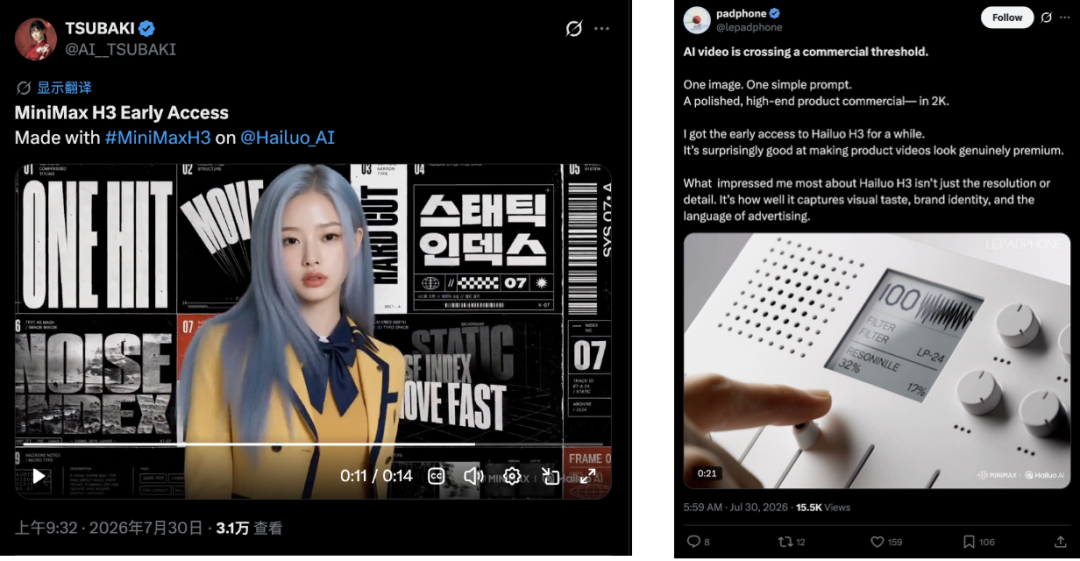
Early testers used H3 for stylized character videos and polished product advertising.
This does not mean professional editing software is obsolete. Longer projects still require precise timeline control, asset management, revisions, legal review, and delivery in multiple formats.
The important change is that a model can now produce something much closer to a finished short-form asset in one generation.
Testing H3 with Promotional Videos and Fast Multi-Shot Prompts
The original author tested H3 through MiniMax’s Hailuo interface.
The first experiment was a fictional boy-band behind-the-scenes video featuring prominent AI-industry leaders. A text prompt described the desired tone and editing style, while H3 generated the visual sequence.
The author then tested a launch video with an Apple-style presentation aesthetic. Only a short style tag was added, yet the generated result included translucent glass effects, gradients, motion graphics, and presentation-like pacing.
A more demanding test used a long prompt describing a six-shot trailer. Each shot had its own emotional direction, performance notes, and rhythm.
According to the report, H3 followed the sequence closely and generated a fast montage with distinct scenes instead of collapsing the instructions into one generic clip.
This type of task tests several abilities at the same time:
- Multi-shot planning
- Character and scene consistency
- Prompt adherence
- Emotional performance
- Camera movement
- Editing rhythm
- Transition design
- Audio and visual synchronization
The results remain subjective demonstrations rather than controlled benchmarks. A successful social-media example does not guarantee that every long prompt will work on the first attempt.
Still, the model appears better suited to structured creative instructions than older video systems that expected one short visual description.
Text Rendering Is One of H3’s Most Commercially Relevant Features
Text has traditionally been one of the most fragile parts of AI-generated video.
An image model only needs to render a word correctly in one frame. A video model must preserve the same letterforms across many frames while the camera, surface, lighting, and surrounding scene continue to move.
A small error in one frame can create flickering, misspelled words, or unstable typography.
The original testing suggests that H3 has reached a usable level for:
- Animated titles
- Promotional typography
- Lyrics videos
- Brand names
- Product labels
- Subtitles
- Motion-graphic text
- UI and website visuals
MiniMax also lists accurate text and brand rendering as a core capability in its official launch material.
The model is not guaranteed to produce perfect text in every generation. Small text, long sentences, unusual fonts, and complex motion can still fail.
What makes H3 more useful is that it appears to model the relationship between the words and the scene.
In one example, text associated with a diamond necklace adopted reflective lighting and depth instead of appearing as a flat overlay. That is closer to visual compositing than ordinary subtitle placement.
For commercial teams, reliable typography is often more valuable than spectacular cinematic motion. Advertising, product launches, and social content all depend on readable information.
Native Audio Connects Voice, Sound Effects, and Music
H3 generates audio and video together.
The official model card specifies:
- 32 kHz stereo audio
- Stable dialogue support for 11 languages
- Native modeling of voice, music, and sound effects
- Joint audiovisual generation rather than a separate post-processing audio stage
The supported dialogue languages listed by MiniMax are:
- Arabic
- Chinese
- English
- French
- German
- Italian
- Japanese
- Korean
- Portuguese
- Russian
- Spanish
Other languages may work with varying quality.
The source article also notes that users can provide audio as a reference. H3 can use a voice clip, music, or another audio asset alongside image and video references.
Audio cannot be the only reference input in the current API. It must be accompanied by an image or video.
This integration is important because a generated voice should match the scene’s timing and emotion. A voiceover added after the video may sound correct but still feel disconnected from facial motion, pacing, or camera cuts.
H3’s native audiovisual design is intended to keep those elements aligned.
Pricing: 2K Video at $0.13 per Second
MiniMax prices H3 by generated video duration.
The current global pay-as-you-go rates are:
| Output | Price |
|---|---|
| 2K video | $0.13 per second |
| 768p video | $0.08 per second |
| 768p-to-2K regeneration | $0.05 per output second |
| H3-Context-IR input | $0.90 per million tokens |
| H3-Context-IR output | $3.60 per million tokens |
At current rates, a 10-second direct generation costs approximately:
| Resolution | Approximate Output Cost |
|---|---|
| 768p | $0.80 |
| 2K | $1.30 |
Reference-input billing follows separate rules:
- Audio references are free.
- The first five image references are free.
- Each image after the first five costs $0.04 during direct generation.
- Reference video is billed according to its duration and the selected output resolution.
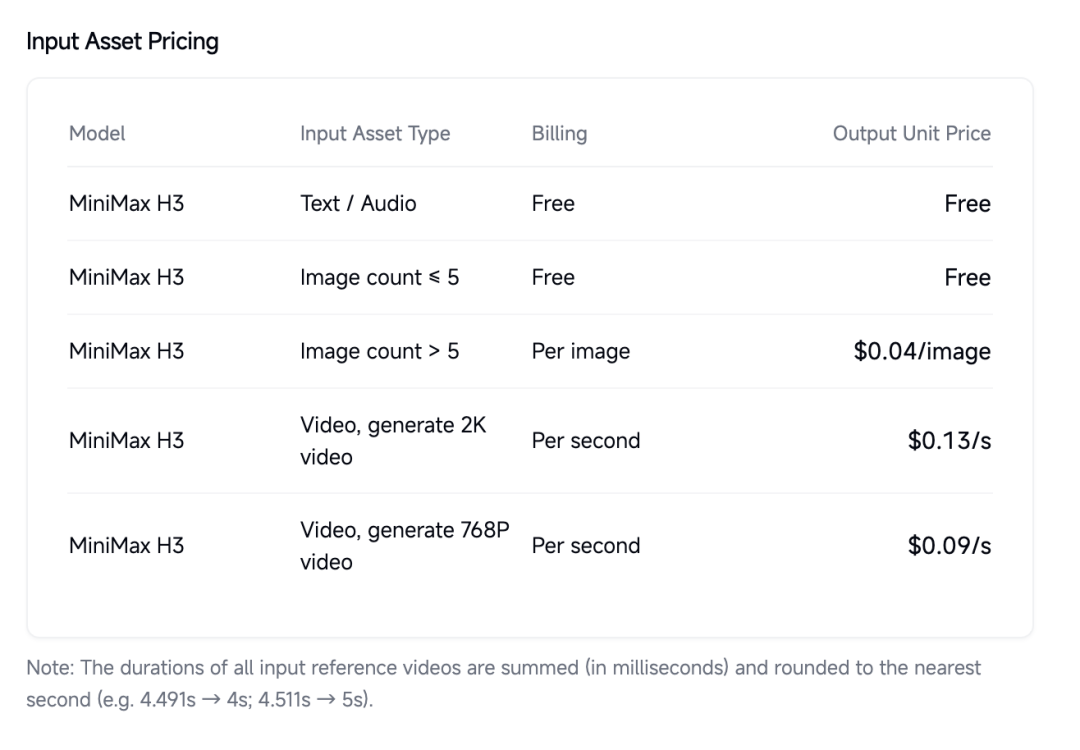
The source article captured the initial H3 input-material and output pricing.
The screenshot above lists 768p generation at $0.09 per second. MiniMax’s current global pricing page now lists **$0.08 per second**, so the live official documentation should be treated as the current source.
MiniMax claims that H3 costs less than one-third of mainstream alternatives at 2K and less than half the cost of mainstream 720p models when generating at 768p.
That comparison is based on MiniMax’s selected competitors and settings. Actual cost per useful video depends on the number of retries, reference assets, clip length, regeneration, and whether the first output is usable.
H3 Ranks First in Artificial Analysis Video Editing
Artificial Analysis currently places MiniMax H3 first on its video-editing leaderboard with audio.
At the time this file was prepared, the ranking showed:
| Rank | Model | Elo | API Price |
|---|---|---|---|
| 1 | MiniMax H3 | 1,129 | $7.80/min |
| 2 | Gemini Omni Flash | 1,122 | $6.00/min |
| 3 | HappyHorse-1.0 | 1,096 | $27.04/min |
| 4 | Wan 2.7 | 1,080 | $16.90/min |
| 5 | Dreamina Seedance 2.0 720p | 1,037 | $5.57/min |
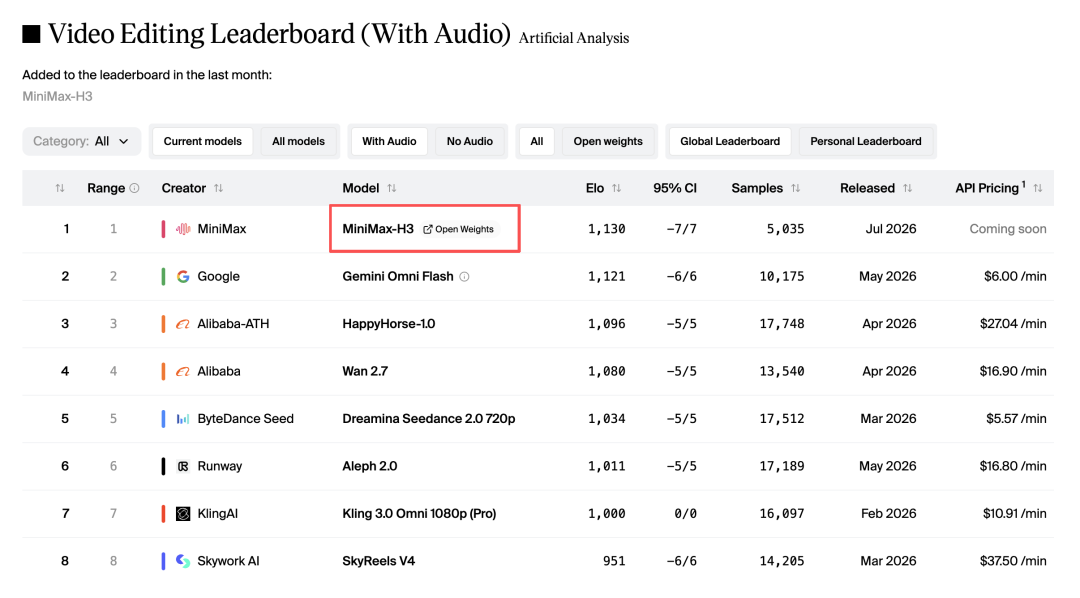
The source article captured H3 at the top of the Artificial Analysis video-editing leaderboard.
H3 also ranks near the top in text-to-video and image-to-video testing.
Leaderboard results can change as new models and votes are added. They measure crowd preference on a particular set of prompts and should not be treated as proof that one model is best for every production workflow.
The result is still notable because H3 combines strong editing scores with released base weights, while many leading video models remain closed.
A Unified Multimodal Input System
H3 does not treat text, images, video, and audio as unrelated input modes.
It accepts them as one multimodal context and attempts to understand how the assets relate to the requested output.
For example, a prompt could ask H3 to:
- Use the camera movement from one video
- Preserve the person shown in an image
- Use a voice from an audio reference
- Follow the rhythm of another clip
- Apply a specified title style
- Generate a new scene containing all of those relationships
The official API currently supports:
| Reference Type | Limit |
|---|---|
| Images | Up to 9 |
| Video clips | Up to 3 |
| Audio clips | Up to 3 |
| Total mixed files | Up to 12 |
Reference video and audio clips must be between 2 and 15 seconds, with a maximum combined duration of 15 seconds for each media type.
The prompt limit is 7,000 characters.
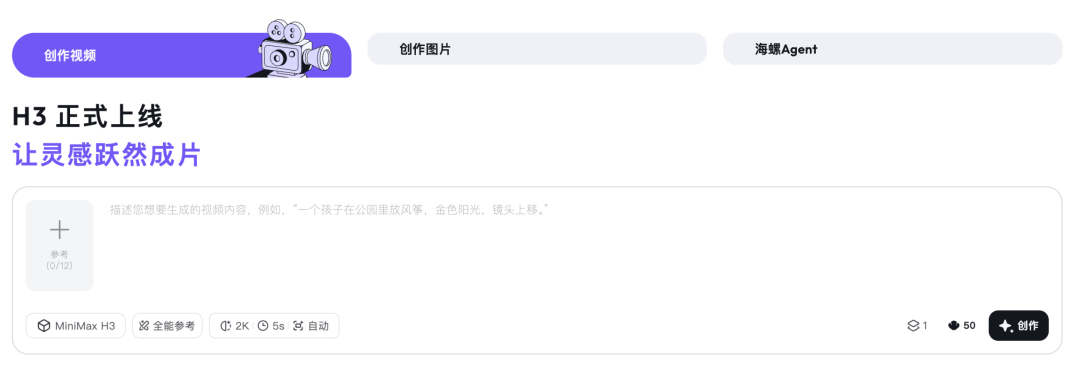
The Hailuo interface combines prompts, multimodal references, resolution, duration, and aspect ratio.
This design makes reference assets more important than writing an extremely long prompt.
A paragraph can describe the desired lighting, but a reference image can communicate the same look more directly. A text description can explain a movement, but a reference video can show the exact timing.
The model’s value comes from interpreting how those references should be recombined rather than merely copying them.
Recent Assets Reduce Repetitive Uploading
The source article highlights a small but useful product feature: uploaded assets appear in a recent-use panel.
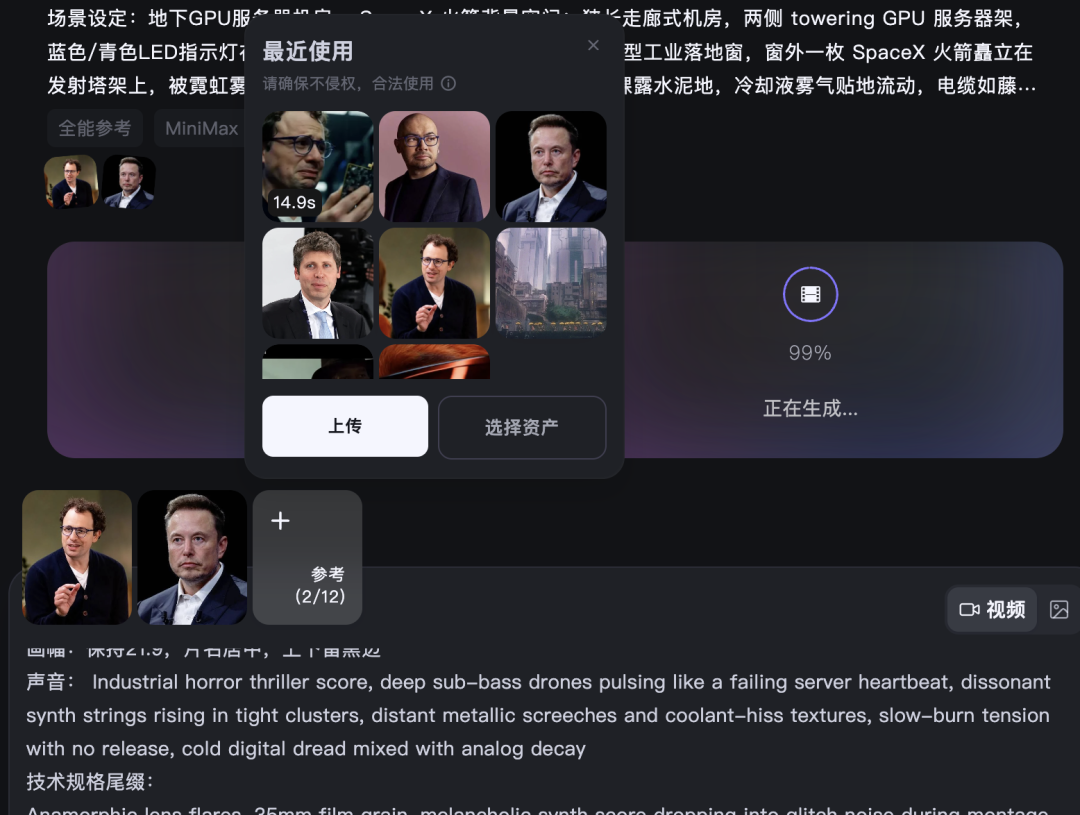
Previously uploaded images and references can be reused from a recent-assets panel.
This is practical for workflows that repeatedly use the same character, product, logo, brand palette, voice, visual style, location, or motion reference.
It reduces the need to upload and organize the same files for every generation.
How H3 Understands Creative Intent
MiniMax describes H3 as a system built around task generalization rather than a collection of separate expert models.
Earlier generative systems often split creative work into isolated tasks such as text-to-video, image-to-video, first-and-last-frame generation, character reference, style reference, motion transfer, voice reference, video editing, sound generation, and music generation.
Build a showcase site and grow leads in minutes
Describe your idea once, and We0 AI can generate a showcase site, pages, and CMS, then help you attract customers and traffic after launch.
One complete project generation for free registration
Best for trying one complete generation flow and seeing a first project draft quickly.
H3 is trained to express many of those relationships through natural language inside one multimodal system.
The full online H3 workflow contains three major modules:
Multimodal input
      ↓
H3-Context-IR
      ↓
H3-Base at 768p
      ↓
H3-Regenerate-2K
      ↓
Final video with stereo audio
H3-Context-IR
H3-Context-IR is a hosted preprocessing and orchestration system.
It analyzes the relationships among text, images, video, and audio, then produces a structured intermediate representation that H3-Base can use.
The system may perform instruction parsing, cross-modal association, temporal analysis, scene decomposition, audio and visual relationship modeling, prompt completion for missing details, and complex logical reasoning.
MiniMax’s technical blog says that some source material requires roughly 100,000 tokens of inference before being distilled into an average context representation of about 4,000 tokens.
H3-Context-IR is not included in the initial open-weight release because it relies on multiple hosted models and services. MiniMax provides it through an API and publishes prompting guidance for teams that want to build their own preprocessing system.
H3-Base
H3-Base produces video and stereo audio at 768p.
Different input modalities are encoded through their corresponding encoders or VAEs, packed into a unified multimodal sequence, and sent into the H3-Omni Transformer.
The released model provides two task-specific checkpoints:
| Checkpoint | Main Tasks |
|---|---|
| H3-Base-FL2VA | Text-to-video and first/last-frame-to-video |
| H3-Base-Ref2VA | Reference-based audio-video generation |
Both checkpoints use BF16 precision.
H3-Regenerate-2K
H3’s 2K workflow is not a conventional upscaler.
The 768p result and the original multimodal context are fed back into H3 so that the model can regenerate the output at a higher resolution.
MiniMax calls this in-context regeneration.
A traditional super-resolution system tries to infer missing detail from the low-resolution video. H3 can reuse the original prompt and references, which may help it recover small text, product details, and scene information more accurately.
H3-Regenerate-2K is not included in the initial open-weight release. It is currently available through MiniMax’s hosted workflow and API.
H3’s Core Technical Components
MiniMax identifies four major technologies behind the system.
Contextual Omni Representation
In a conventional video prompt, a caption describes the target clip.
In H3, the caption must also explain how each reference relates to the output, how the references relate to one another, which motion should come from which video, which voice belongs to which character, how audio changes across multiple shots, and what should be preserved or edited.
Language acts as the bridge connecting these multimodal relationships.
MiniMax built dedicated models and a full-modality understanding pipeline to generate this representation.
H3-VAE
H3 uses separate visual and audio latent spaces.
The visual VAE is a temporally causal video autoencoder with 16× spatial compression, 4× temporal compression, 24 latent channels, and additional patchification before the Transformer.
MiniMax says the new VAE provides a 4× gain in effective sequence length compared with its earlier approach, reducing training and inference costs while helping support native 2K generation.
The audio VAE processes the left and right stereo channels independently before recombining them. It compresses 32 kHz audio into latent tokens at 40 Hz per channel.
H3-Omni Transformer
H3-Omni Transformer is a dense, single-stream Transformer.
The official model card lists:
- 33 billion total parameters
- Approximately 13 billion parameters in AdaLN-related branches
- Joint prediction of video and audio latents
- Three-dimensional multimodal rotary position embeddings
- Unified attention and feed-forward layers without modality-specific blocks
MiniMax says the AdaLN modulation output can be precomputed and cached, so those parameters do not need to be loaded for inference-only deployments.
The model separates understanding and generation workloads during training to better handle large variation in multimodal sequence lengths. MiniMax reports that this improved end-to-end training throughput by nearly 30%.
Sparse Attention
H3 was trained with native sparse attention to reduce the cost of long multimodal sequences.
The initial open-weight release currently uses full attention for inference. MiniMax says the sparse-attention implementation will be released in a future update.
This distinction matters for local deployment because the currently available implementation may require more compute than MiniMax’s internal optimized serving stack.
Open Weights: What Has Actually Been Released
MiniMax released the H3-Base weights on Hugging Face under the MiniMax H3 Community License Agreement.
The repository includes H3-Base-FL2VA, H3-Base-Ref2VA, processor files, tokenizer files, the text encoder, Omni Transformer weights, visual and audio VAEs, example scripts, deployment instructions, and reproducible 768p examples.
The checkpoints use the full pretrained weights of Qwen3-VL-32B as the H3 encoder and provide its 50th-layer hidden states to the H3-Omni Transformer.
The model can be downloaded with:
hf download MiniMaxAI/MiniMax-H3 --local-dir MiniMax-H3
MiniMax lists SGLang, vLLM, Diffusers, and ComfyUI as supported or recommended inference frameworks.
Its SGLang example uses four GPUs:
sglang serve \
  --model-path MiniMaxAI/MiniMax-H3 \
  --num-gpus 4 \
  --ulysses-degree 4 \
  --performance-mode speed \
  --host 0.0.0.0 \
  --port 30010 \
  --model-variant fl2va
This is an official example, not a universal minimum requirement. Actual memory and performance depend on the checkpoint, duration, resolution, implementation, and hardware.
The Entire Online System Is Not Yet Fully Open
Calling H3 simply “fully open source” can be misleading.
The released H3-Base weights are substantial and support local 768p generation. However:
- H3-Context-IR remains a hosted system.
- H3-Regenerate-2K is not yet released.
- Sparse-attention inference is not included in the first release.
- The model uses a MiniMax community license rather than a standard permissive license such as Apache 2.0.
Teams should review the license and architecture notes before planning commercial deployment.
For private brand assets, the release still creates meaningful options. Companies can study, fine-tune, and deploy the base model within the license terms without sending every source asset to a third-party generation interface.
Using MiniMax H3 Through the API
The official API supports three primary generation modes:
- Text-to-video
- First/last-frame image-to-video
- Multimodal reference generation
The generation workflow is asynchronous:
- Submit a task and receive a
task_id. - Poll the task status.
- Retrieve the video URL after the task succeeds.
- Download and save the result.
Developers can also use the official MiniMax CLI:
npm install -g mmx-cli
mmx auth login
mmx video generate \
  --model MiniMax-H3 \
  --prompt "A polished product commercial with animated typography"
For a multimodal reference workflow:
mmx video generate \
  --model MiniMax-H3 \
  --prompt "Keep the same character and follow the reference motion" \
  --reference-image character.png \
  --reference-video motion.mp4
The CLI and API documentation should be checked before production use because input limits, billing, and supported parameters may change.
What H3 Means for Video Production
H3 does not eliminate every post-production task.
A professional campaign may still require frame-accurate editing, client review, licensed music, legal and copyright checks, precise brand compliance, long-form continuity, multiple aspect-ratio exports, human performance direction, and color-managed delivery.
What H3 changes is the starting point.
Instead of receiving a silent piece of footage, a creator can receive a short asset containing cuts, sound, typography, voice, effects, and a recognizable visual direction.
That makes the model particularly relevant to:
- Social media advertisements
- Product promos
- E-commerce videos
- Music visuals
- Motion posters
- Brand concept testing
- Rapid campaign variations
- Game and UI concept videos
The model also shows how video generation is becoming less task-specific. A single system can increasingly interpret a collection of creative assets and execute a more complete brief.
常见问题
What is MiniMax H3?
MiniMax H3 is a general-purpose multimodal video-generation and editing system. It accepts text, image, video, and audio inputs and can produce 4–15 second videos with synchronized stereo sound.
Can MiniMax H3 generate 2K video?
Yes. The hosted API supports 2K output. The full workflow first produces a 768p result with H3-Base and then uses H3-Regenerate-2K to regenerate the video at higher resolution with the original context.
Is MiniMax H3 open source?
MiniMax has released H3-Base weights under its community license. The complete online system is not fully open because H3-Context-IR, H3-Regenerate-2K, and sparse-attention inference are not all included in the initial release.
Can MiniMax H3 run locally?
Yes, the released H3-Base checkpoints can be deployed locally for 768p generation. MiniMax provides examples for SGLang and links to vLLM, Diffusers, and ComfyUI workflows, but the model requires substantial GPU resources.
How much does the MiniMax H3 API cost?
The current global list price is $0.13 per generated second at 2K and $0.08 per second at 768p. Reference images after the first five, reference videos, regeneration, and H3-Context-IR may add additional charges.
Does H3 generate audio with the video?
Yes. H3 jointly generates video and native 32 kHz stereo audio, including dialogue, music, and sound effects.
How many reference files can H3 accept?
The API supports up to nine images, three videos, and three audio clips, with a maximum of 12 mixed files. Duration and file-size limits also apply.
Is H3 suitable for commercial video production?
MiniMax designed H3 for advertising, branding, e-commerce, product design, UI and UX, and other commercial uses. Teams should still review the output, verify rights to all input assets, and check the community license and platform terms.
相关工具
- Hailuo AI: MiniMax’s global web application for creating videos with H3.
- MiniMax H3 on Hugging Face: The official H3-Base weights, model card, architecture notes, and local deployment examples.
- MiniMax API: The official global platform for generating H3 videos through an API.
- MiniMax CLI: The official command-line tool for generating video, image, speech, music, and text.
- SGLang: A serving framework supported by MiniMax’s H3 local-deployment examples.
- ComfyUI: A node-based workflow environment with official H3 video-generation tutorials.
- Artificial Analysis Video Arena: A blind-voting leaderboard for comparing video-editing models.
Related Links
- MiniMax H3 Official Technical Blog: MiniMax’s launch article covering capabilities, design philosophy, architecture, pricing claims, and roadmap.
- MiniMax H3 Model Card: Official details about the released checkpoints, license, supported tasks, and system modules.
- MiniMax Video Generation Documentation: Official API modes, input limits, workflow, and code examples.
- MiniMax Pay-as-You-Go Pricing: Current H3 generation, reference-input, regeneration, and Context-IR pricing.
- MiniMax CLI GitHub Repository: Installation and command examples for H3 generation.
- ComfyUI H3 Tutorial: Official ComfyUI workflows for local and API-based H3 generation.
- Artificial Analysis Video Editing Leaderboard: Current crowd-ranked video-editing results and API price comparisons.
Summary
MiniMax H3 moves AI video beyond isolated clip generation by combining visual generation, editing logic, typography, dialogue, sound effects, music, and multimodal references in one system.
The hosted version produces 4–15 second videos with native stereo audio and up to 2K output. It currently leads the Artificial Analysis video-editing leaderboard and is priced at $0.13 per generated second for 2K output on MiniMax’s global API.
MiniMax has now released the H3-Base checkpoints, enabling local 768p generation and further development. The full hosted workflow remains partly closed because Context-IR, 2K regeneration, and sparse-attention inference have not all been released.
H3’s main shift is not simply better footage—it is the move from generating a clip to interpreting and executing a complete short-form creative brief.


